



If you can’t open the Steam overlay in CS2 (Shift + Tab), can’t view friends, or your workshop maps won’t load, it’s almost always because Steam Community In-Game is disabled.
This guide will walk you through every fix, step-by-step, with screenshots-style explanations, pro tips, and common issues players overlook.
Perfect for new players, returning CSGO veterans, and anyone building up their CS2 knowledge cluster (just like your other guides on ranks, smokes, and settings).
What Is the Steam Community In-Game?
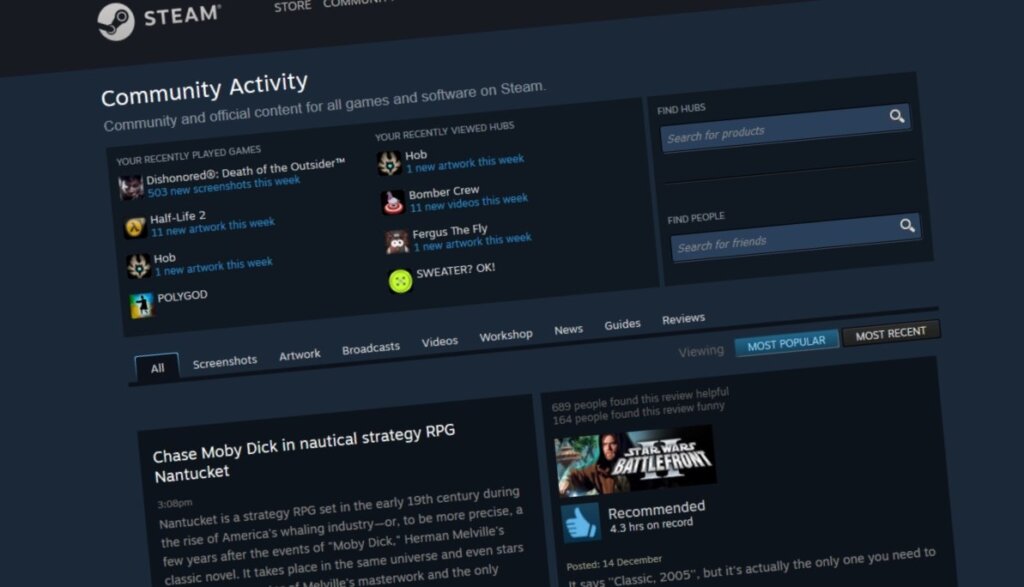
The Steam Community overlay is the interface you access using Shift + Tab.
It lets you:
- See your friends list
- Accept invites
- Chat and join lobbies
- Use browser/Steam guides mid-game
- Take screenshots
- View Workshop items and maps
- Access item inventory
- Redeem CS2 inspect links
If it’s disabled, CS2 feels broken — especially when you’re trying to play with friends or test lineups on maps like Ancient, Anubis, or Nuke.
How to Enable Steam Community In-Game (Fast Method)
Here’s the simplest way to turn the overlay back on:
Step 1: Open Steam Settings
- Launch Steam
- Click Steam → Settings (top-left)
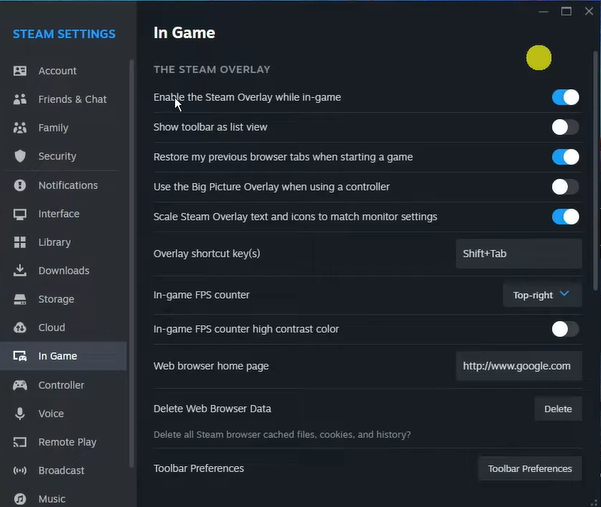
Step 2: Open the “In-Game” Tab
You’ll see several checkboxes.
Step 3: Enable the Overlay
Turn on:
Enable the Steam Overlay while in-game
This is the main toggle.
Optional but recommended:
- Enable FPS counter (helps when reading guides like Show FPS in CS2)
- Record input history
- Open screenshots folder on save
Step 4: Relaunch CS2
Restart the game to apply changes.
Press Shift + Tab once inside CS2 — you should now see the overlay pop up.
Method 2: Enable Steam Community In-Game for CS2 Specifically
If global settings are correct but CS2 still won’t allow it:
- Go to your Steam Library
- Right-click Counter-Strike 2
- Select Properties
- Under the General tab
- Make sure this is checked:
Enable the Steam Overlay while in-game
This per-game setting overrides global settings.
Many players accidentally turn it off while tweaking CS2 launch options or performance settings.
Method 3: Overlay Still Not Working? Try These Fixes
Fix 1: Disable Fullscreen Exclusive Mode
CS2 sometimes blocks overlays when using exclusive fullscreen.
- Open CS2 settings
- Go to Video
- Set:
- Display Mode: Fullscreen Windowed
- Display Mode: Fullscreen Windowed
This also helps if you’re dealing with issues like
CS2 Black Screen on Launch or CS2 Freezing.
Fix 2: Remove Conflicting Launch Options
Some launch options break the overlay.
Problematic launch options include:
-novid
-nojoy
-safe
-perfectworld
To fix:
- Right-click CS2 → Properties
- Remove all launch options
- Restart Steam.
Fix 3: Check Steam File Permissions
Windows may block Steam from overlay access.
- Close Steam completely
- Right-click Steam → Run as Administrator
- Launch CS2
Fix 4: Disable Third-Party Software Blocking the Overlay
Programs that can block overlays include:
- Discord overlay
- NVIDIA overlay
- AMD Radeon overlay
- MSI Afterburner
- Razer Cortex
- Overwolf
- Any screen recorder
Disable them one by one to isolate the culprit.
Why You Should Keep Steam Community Enabled in CS2
Enabling the Steam overlay unlocks critical features players use every day:
1. Workshop Maps & Training
Players who use Aim Botz, Recoil Master, or smoke training maps (like when practicing lineups for Ancient Smokes or Anubis Smokes) depend on it.
2. Joining Friends Easily
Your invites and lobby tabs rely on the overlay.
3. Taking Screenshots
Useful for sharing skins, reporting bugs, or showing off a new Karambit from a case.
4. Item Inspection & Skin Research
5. Quick Access to Community Guides
Players often rely on guides mid-match for:
Common Reasons the Overlay Won’t Enable
| Issue | Cause | Solution |
| Overlay hotkey changed | Custom keybind | Reset to Shift + Tab |
| Steam beta client bug | Steam update conflict | Opt out of beta |
| Fullscreen exclusive | Blocks overlays | Switch to fullscreen windowed |
| Broken configs | Incorrect launch settings | Remove launch options |
| Disabled per-game setting | CS2 only disabled | Enable in CS2 properties |
| Third-party overlays | Software conflict | Disable conflicting apps |
Frequently Asked Questions (FAQs)
1. Why is my Steam overlay not working in CS2?
Usually because it’s disabled globally or for CS2 specifically. Check both settings and ensure no conflicting launch options.
2. What is the shortcut for Steam Community in CS2?
The default is Shift + Tab.
3. Does fullscreen mode break the overlay?
Yes — Fullscreen Windowed is the recommended mode for overlays.
4. Can third-party programs block the Steam overlay?
Yes. Discord, NVIDIA overlays, MSI Afterburner, and recorders can block it.
5. Will enabling the overlay affect performance?
No, the performance impact is minimal unless running many overlays simultaneously.
Final Thoughts
Enabling Steam Community in-game is essential for a smooth CS2 experience — whether you’re practicing smokes, inspecting skins, joining friends, or browsing guides mid-game.