



Frederik “roej” Jørgensen has rapidly established himself as one of Denmark’s most promising CS2 talents. If you’re looking to learn from roej CS2 settings and replicate his precise playstyle, this guide breaks down everything from his crosshair to his mouse sensitivity.
Roej combines sharp aim with intelligent positioning, making his config worth studying for players looking to elevate their game.
Who Is Roej?
Roej is a Danish professional Counter-Strike player known for his versatile rifling and ability to perform under pressure. He’s built a reputation for consistent performances in high-stakes matches, showcasing the kind of mechanical skill that separates tier-one talent from the rest.
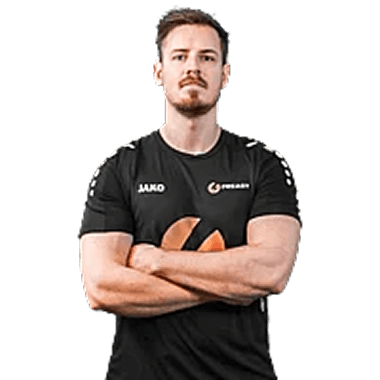
His playstyle emphasizes clean crosshair placement and efficient movement fundamentals that his settings help support.
Roej Mouse Settings
Mouse settings are arguably the most personal aspect of any CS2 config. Roej uses settings that balance precision for rifle duels with enough speed for quick flick shots.
| Setting | Value |
|---|---|
| DPI | 800 |
| In-Game Sensitivity | 1.0 |
| eDPI | 800 |
| Zoom Sensitivity | 1.0 |
| Hz (Polling Rate) | 1000 |
| Windows Sensitivity | 6 |
| Raw Input | On |
| Mouse Acceleration | Off |
An eDPI of 800 sits in the medium-low range preferred by many professional players. This allows for precise micro-adjustments when holding angles while still enabling comfortable 180-degree turns.
If you’re experimenting with similar sensitivity, ensure you have adequate mousepad space. Most pros using this eDPI range use large mousepads (400mm+ in width).
Roej Crosshair Settings
Roej uses a clean, static crosshair that provides clear visibility without cluttering the screen. Here’s his exact configuration:
| Setting | Value |
|---|---|
| Style | 4 (Classic Static) |
| Size | 2 |
| Gap | -2 |
| Thickness | 1 |
| Outline | No |
| Color | Green (1) |
| Dot | No |
Crosshair Code
Copy and paste this into your console:
cl_crosshair_drawoutline 0; cl_crosshair_dynamic_maxdist_splitratio 0.35; cl_crosshair_dynamic_splitalpha_innermod 1; cl_crosshair_dynamic_splitalpha_outermod 0.5; cl_crosshair_dynamic_splitdist 7; cl_crosshair_outlinethickness 1; cl_crosshair_sniper_width 1; cl_crosshair_t 0; cl_crosshairalpha 255; cl_crosshaircolor 1; cl_crosshaircolor_b 50; cl_crosshaircolor_g 250; cl_crosshaircolor_r 50; cl_crosshairdot 0; cl_crosshairgap -2; cl_crosshairsize 2; cl_crosshairstyle 4; cl_crosshairthickness 1This crosshair works well with rifles like the AK-47 and M4A4, providing a tight center point for headshot placement.
Roej Viewmodel Settings
Viewmodel settings affect how your weapon appears on screen. Roej uses a configuration that maximizes screen visibility while keeping the weapon model compact.
| Setting | Value |
|---|---|
| Viewmodel FOV | 68 |
| Viewmodel Offset X | 2.5 |
| Viewmodel Offset Y | 0 |
| Viewmodel Offset Z | -1.5 |
| Viewmodel Presetpos | 3 |
| Bob | Disabled |
Viewmodel Commands
viewmodel_fov 68; viewmodel_offset_x 2.5; viewmodel_offset_y 0; viewmodel_offset_z -1.5; viewmodel_presetpos 3; cl_bob_lower_amt 5; cl_bobamt_lat 0.1; cl_bobamt_vert 0.1; cl_bobcycle 0.98These settings push the weapon model slightly to the right and down, clearing up the center of your screen for better target acquisition.
Roej Video Settings
Professional players prioritize performance over visuals. Roej’s video settings reflect this philosophy, ensuring maximum frame rates for smooth gameplay.
| Setting | Value |
|---|---|
| Resolution | 1280×960 |
| Aspect Ratio | 4:3 |
| Scaling Mode | Stretched |
| Display Mode | Fullscreen |
Graphics Settings
| Setting | Value |
|---|---|
| Global Shadow Quality | Medium |
| Model/Texture Detail | Low |
| Texture Filtering Mode | Bilinear |
| Shader Detail | Low |
| Particle Detail | Low |
| Ambient Occlusion | Disabled |
| High Dynamic Range | Performance |
| FidelityFX Super Resolution | Disabled |
| NVIDIA Reflex Low Latency | Enabled |
The 4:3 stretched resolution makes player models appear wider, which some players find easier to track and hit. This is a common choice among professionals, though it does reduce your horizontal field of view.
If you’re practicing on CS2 maps, these settings ensure consistent performance across all competitive environments.
Roej Keybinds
Efficient keybinds allow for faster utility usage and weapon switching. Here are roej’s key bindings:
| Action | Key |
|---|---|
| Jump | Space / Mouse Wheel Down |
| Duck | Left Ctrl |
| Walk | Left Shift |
| Use | E |
| Reload | R |
| Drop Weapon | G |
| Inspect Weapon | F |
Utility Binds
| Grenade | Key |
|---|---|
| Smoke | 4 |
| Flashbang | F |
| HE Grenade | C |
| Molotov/Incendiary | X |
Having dedicated grenade binds eliminates scroll-wheel cycling, allowing for instant utility deployment. This is crucial during fast-paced executes or retakes.
For more advanced binding options, check out our CS2 binds guide.
Roej Gear & Peripherals
Your hardware matters. Here’s what roej uses to compete at the highest level:
| Peripheral | Product |
|---|---|
| Mouse | Logitech G Pro X Superlight |
| Mousepad | Artisan Hien (XL) |
| Keyboard | Wooting 60HE |
| Headset | HyperX Cloud II |
| Monitor | BenQ ZOWIE XL2546K (240Hz) |
The Logitech G Pro X Superlight is one of the most popular mice among CS2 professionals due to its lightweight design (63g) and reliable sensor. The Wooting 60HE keyboard features analog switches that allow for adjustable actuation points useful for movement techniques.
How to Apply Roej’s Settings
Follow these steps to implement roej’s config:
- Launch CS2 and open the console (enable it in Game Settings if needed)
- Copy the crosshair code and paste it into the console
- Adjust mouse settings in the Game Settings menu
- Apply video settings and restart if necessary
- Set up keybinds in the Keyboard/Mouse settings
You can save these settings permanently by adding them to your autoexec file. Find your CS2 config location and create an autoexec.cfg if you don’t have one.
Should You Copy Pro Settings Exactly?
While roej’s settings provide an excellent starting point, remember that professional configs are optimized for their specific playstyles and preferences.
Consider these factors before copying settings directly:
- Mouse sensitivity depends heavily on your mousepad size and arm/wrist aiming style
- Resolution preferences vary based on monitor size and personal comfort
- Crosshair choice should prioritize what you can track consistently
Use roej’s config as a foundation, then make small adjustments based on your performance. Test changes in practice modes before taking them into competitive matches.
Conclusion
Roej’s CS2 settings emphasize clean visuals, consistent performance, and efficient keybinds all hallmarks of professional-level configuration. His medium-low sensitivity and static crosshair support the precise aim that’s made him a standout player.
Copy his settings as a starting point, but don’t be afraid to tweak values until they feel natural. The best config is ultimately the one that helps you perform consistently.
Looking to upgrade your loadout while you’re at it? Browse CS2 skins to find the perfect look for your weapons.