




What Does CS2 Matchmaking Unavailable Mean?
When you see CS2 matchmaking unavailable, cannot begin matchmaking CS2, or CS2 matchmaking failed, it usually means your game can’t properly connect to Valve’s matchmaking servers.
This isn’t always your fault. The issue can come from:
- CS2 or Steam servers being down
- Network or ISP problems
- Corrupted game files
- Incorrect launch or network settings
The good news? Most of these are easy to fix.
Common CS2 Matchmaking Errors Explained
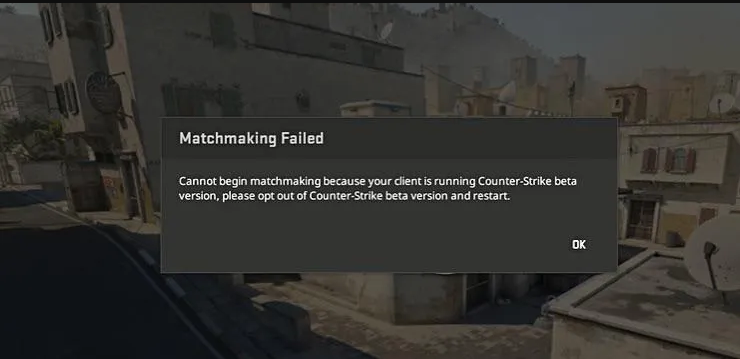
Here’s what players usually see:
- CS2 matchmaking failed – The game tried to queue but lost connection
- Cannot begin matchmaking CS2 – Steam couldn’t start a session
- CS2 failed to connect to match – Server handshake failed mid-process
All of these point to the same root problem: unstable or blocked connectivity.
Quick Checks Before You Try Anything Else
Before diving into deeper fixes, do these quick checks:
- Restart CS2 and Steam
- Log out of Steam, then log back in
- Restart your PC and router
- Disable VPNs or game boosters temporarily
If matchmaking still doesn’t work, move on to the fixes below.
Fix 1: Check CS2 Server Status
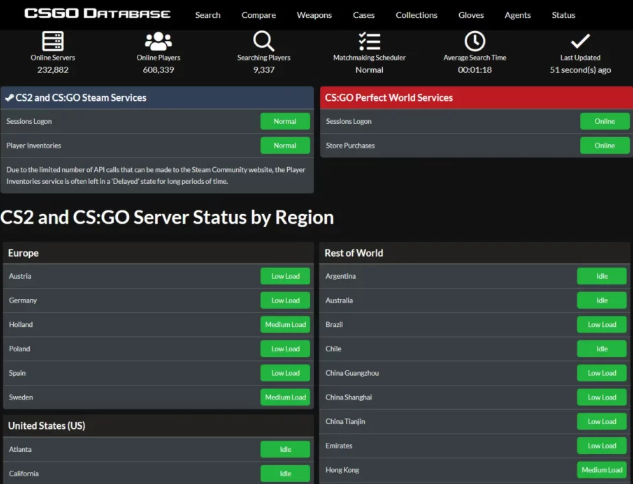
Sometimes matchmaking is unavailable because Valve servers are down or overloaded.
If servers are having issues:
- Competitive and Premier queues may fail
- You may get stuck on “connecting to matchmaking”
During outages, your best option is to wait or play on CS2 Custom Maps until services stabilize.
Fix 2: Verify CS2 Game Files (Very Important)
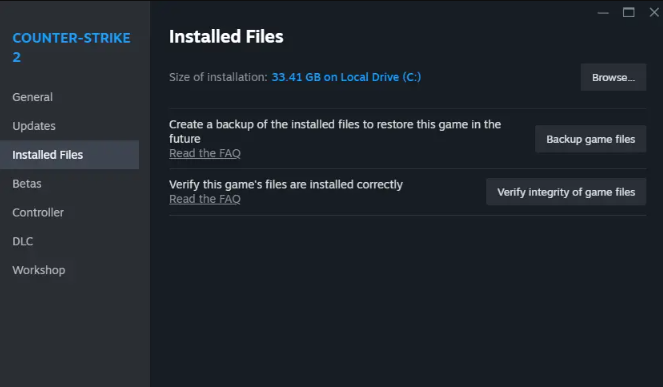
Corrupted files are one of the most common causes.
How to verify CS2 files:
- Open Steam
- Go to Library → Counter-Strike 2
- Right-click → Properties
- Installed Files → Verify integrity of game files
This alone fixes matchmaking issues for a huge number of players.
Fix 3: Check Your Network Stability
CS2 matchmaking is extremely sensitive to packet loss and unstable routing.
Make sure:
- You’re on a wired connection if possible
- No large downloads are running
- Your ping isn’t constantly spiking
If you often rubberband or disconnect, this guide on CS2 Rubberbanding can help stabilize your connection.
Fix 4: Disable Conflicting Launch Options
Certain launch options can break matchmaking.
Go to CS2 Launch Options and remove:
- Old CS:GO commands
- Experimental networking flags
- Third-party FPS or input tweaks
Restart the game and try queueing again.
Fix 5: Check Firewall and Antivirus
Firewalls sometimes block CS2 matchmaking traffic.
Try this:
- Temporarily disable your antivirus
- Add CS2 and Steam as firewall exceptions
- Make sure Steam isn’t blocked on private networks
After testing, re-enable protection with proper exceptions added.
Fix 6: Reset Your Steam Network Settings
Steam can get stuck using a bad network route.
Steps:
- Open Steam Settings
- Go to Downloads
- Change Download Region (pick a nearby one)
- Restart Steam
This often fixes CS2 failed to connect to match errors instantly.
Fix 7: Check Trust Factor & Account Status
Low Trust Factor or account restrictions can sometimes cause matchmaking issues.
Make sure:
- Your account isn’t trade or communication restricted
- Steam Guard is enabled
- You’re not using suspicious software
You can learn more in our What Is Premier CS2 guide if you’re queuing ranked modes.
Fix 8: Try a Different Game Mode
Sometimes only one queue is affected.
Test:
- Competitive instead of Premier
- Deathmatch or Casual
If everything fails, community servers and CS2 Custom Maps are a solid temporary alternative.
Does CS2 Matchmaking Unavailable Affect Skins or Inventory?
No. Matchmaking errors do not affect your skins, cases, or inventory.
If you’re worried about drops or progression, you can still:
- Open cases from Knife Cases in CS2
- Explore rare knives via CS2 Cases With Butterfly Knife
Your items remain completely safe.
Frequently Asked Questions (FAQs)
Why does CS2 say matchmaking unavailable?
Usually due to server outages, network instability, or corrupted files.
How long does CS2 matchmaking downtime last?
It can last from a few minutes to several hours, depending on server load or updates.
Can VPNs cause CS2 matchmaking failed errors?
Yes. VPNs often increase latency or block Steam routing.
Does reinstalling CS2 fix matchmaking?
It can, but verifying game files usually works faster.
Final Thoughts
Seeing CS2 matchmaking unavailable is frustrating, but in most cases, it’s a temporary or fixable issue. Start with server checks and file verification, then work through network and Steam fixes.
If all else fails, chill on community servers, tweak your settings, and jump back into matchmaking once everything stabilizes. CS2 queues always come back online.