



Want to aim like a Major MVP? The jL CS2 settings used by Latvian superstar Ģusts “jL” Balzers are among the most copied configs in Counter-Strike right now — and for good reason. After leading his team to the PGL Copenhagen 2024 Major title and picking up MVP honors, jL has cemented himself as one of the best AWPers in the world. Below, we break down his exact crosshair, sensitivity, viewmodel, and video settings so you can match his setup in minutes.
Who Is jL?
jL is a Latvian professional Counter-Strike 2 player best known for his aggressive AWPing style and clutch play. He rose to global fame during the 2024 Major run, where his performance earned him tournament MVP.
Whether he’s holding an angle on Mid or peeking with his awp, his setup is dialed in for one thing: precision one-taps. Let’s get into the config.
jL CS2 Sensitivity & Mouse Settings
jL uses a low-to-medium sensitivity typical of pro AWPers — enough to make big angle swings, but low enough for micro-adjustments on long-range flicks.
| Setting | Value |
|---|---|
| DPI | 400 |
| Sensitivity | 1.75 |
| eDPI | 700 |
| Zoom Sensitivity | 1.00 |
| Windows Sensitivity | 6 |
| Polling Rate | 1000 Hz |
| Raw Input | On |
| Mouse Acceleration | Off |
Key takeaway: An eDPI of 700 is on the lower end for pros, giving jL massive control over his AWP flicks. If you’re an aspiring awp skin collector and rifler, this is a great baseline.
jL CS2 Crosshair
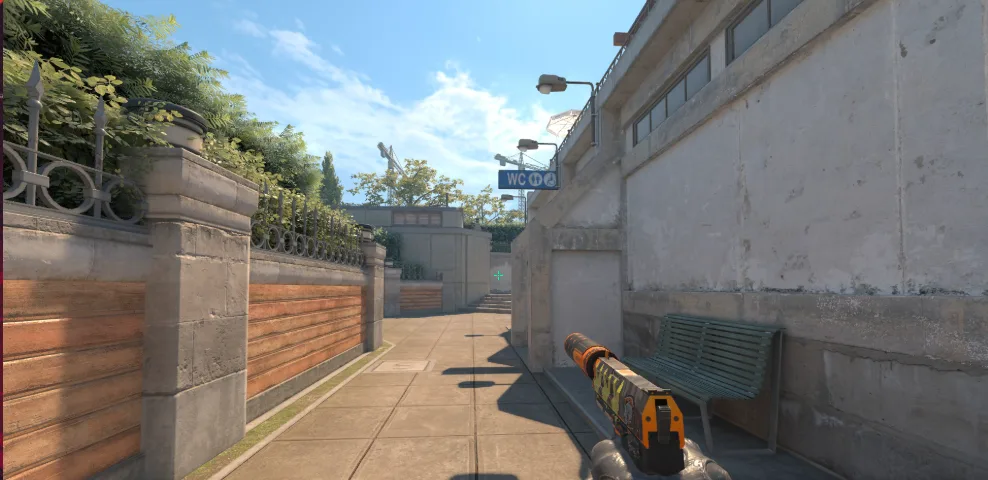
His crosshair is a clean, small classic style — easy to see without cluttering your view.
cl_crosshairstyle 4cl_crosshairsize 2
cl_crosshairthickness 1
cl_crosshairgap -3
cl_crosshairdot 0
cl_crosshair_drawoutline 0
cl_crosshaircolor 1
cl_crosshaircolor_r 0
cl_crosshaircolor_g 255
cl_crosshaircolor_b 0
cl_crosshairalpha 255
Copy-paste into your console or autoexec.cfg and you’re set. The bright green color and tight gap make it easy to track heads on maps like Mirage and Inferno.
jL CS2 Viewmodel Settings
jL keeps his viewmodel classic — no extreme desktop settings here.
| Setting | Value |
|---|---|
| viewmodel_fov | 68 |
| viewmodel_offset_x | 2.5 |
| viewmodel_offset_y | 0 |
| viewmodel_offset_z | -1.5 |
| viewmodel_presetpos | 3 |
| cl_bob_lower_amt | 5 |
| cl_bobamt_lat | 0.1 |
| cl_bobamt_vert | 0.1 |
| cl_viewmodel_shift_left_amt | 0.5 |
| cl_viewmodel_shift_right_amt | 0.25 |
The classic preset (presetpos 3) is the go-to for most pros — it keeps the weapon out of your line of sight without feeling floaty.
jL CS2 Video Settings
jL runs a fairly clean video config that prioritizes framerate and clarity over eye candy. Perfect for spotting enemies through smokes and in dark corners.
| Setting | Value |
|---|---|
| Resolution | 1280 x 960 |
| Aspect Ratio | 4:3 |
| Scaling Mode | Stretched |
| Display Mode | Fullscreen |
| Refresh Rate | 240+ Hz |
| Boost Player Contrast | Enabled |
| Wait for Vertical Sync | Disabled |
| Multisampling AA Mode | 2x MSAA |
| Global Shadow Quality | High |
| Model / Texture Detail | Low |
| Texture Filtering Mode | Bilinear |
| Shader Detail | Low |
| Particle Detail | Low |
| Ambient Occlusion | Disabled |
| High Dynamic Range | Quality |
| FidelityFX Super Resolution | Disabled (Highest) |
Why 4:3 stretched? It makes enemy models appear wider and easier to hit — a preference shared by many pros who came up in the CS:GO era.
jL CS2 Launch Options
Launch options fine-tune performance the moment CS2 loads. Add these via Steam → Right-click CS2 → Properties → Launch Options:
-novid -console -allow_third_party_software- -novid skips the Valve intro
- -console enables the developer console at launch
- -allow_third_party_software allows tools like NVIDIA Reflex or OBS overlays
If you want to dive deeper into optimization, check out our dedicated cs2 graphic settings guide.
jL CS2 Gear & Peripherals
The right settings only work if paired with the right hardware. Here’s a summary of what jL uses:
- Mouse: Logitech G Pro X Superlight
- Keyboard: Wooting 60HE
- Headset: Logitech G Pro X
- Monitor: 240Hz+ display
- Mousepad: Large control-focused pad
His mouse of choice is lightweight and wireless — ideal for the wide arm-swings needed for aggressive AWPing.
How to Apply jL’s Config in CS2
- Open Steam and launch CS2 once to generate config files.
- Navigate to
Steam\userdata\[YourID]\730\local\cfg\. - Create a file named
autoexec.cfgand paste jL’s crosshair and viewmodel commands. - Add
exec autoexecto your launch options or type it in the console. - Restart CS2 — settings should be locked in.
Should You Copy jL’s Settings?
Copying a pro’s setup won’t magically make you a Major MVP, but there are real benefits:
- Optimized baseline — no more guessing on sensitivity or crosshair size
- Competitive resolution — 4:3 stretched still dominates the top level
- Framerate first — low-detail settings free up FPS for smoother aim
If you main the AWP, jL’s config is one of the strongest starting points you can copy. Want to compare with other top AWPers? Check out our w0nderful cs2 settings and broky cs2 settings breakdowns.
You can also browse all rifles and all cs2 skins to build a loadout that looks as sharp as your aim.
Final Thoughts
jL’s settings are proof that simple, low-sensitivity configs still rule the top of CS2. His 400 DPI at 1.75 sensitivity, tight green crosshair, and stretched 4:3 resolution are a proven recipe for AWP dominance. Copy his config, plug in your favorite awp, and start grinding — one flick at a time.
For more pro setups, browse our full library of player configs on blog.cs2.ad, and shop skins, cases, and stickers over at cs2.