




CS2 Grenade Binds: Everything You Need to Know
Gunplay is an important element of Counter-Strike. Players who use grenades properly are often in situations when their bullets are more impactful—so they win duels and rounds. Teams that coordinate utility usage from the purchase stage to throwing them across the maps are much more successful in Competitive and Premier modes. Having grenade binds in CS2 is a crucial factor for both individual and team progress.
In a nutshell, CS2 grenade binds allow players to take the specific utility type they need in each situation. When you have a key connected to a grenade, you don’t need to scroll the available options by pressing 4 or the mouse wheel.
Not only does it let you throw the correct grenade quicker, but it’s also a chance to return to the primary weapon in time and win the shooting mayhem.
Everything about grenade binds is explained in this article on DMarket Blog. Also, here is the essential info on how to use grenades in CS2.
Types of Grenades in CS2
Counter-Strike 2 offers players five types of grenades. Each has its own purpose in the matches.
High-Explosive (HE) Grenades
HE grenades are pretty straightforward. You throw one at opponents, and the explosion deals damage. HE grenades are often used on the spots where players tend to gather before rushing for an attack or where defenders prefer to hold their positions. Such CS2 grenades can give players a health advantage in the gun duels that follow, or even kill low-health opponents.
Another important purpose of HE grenades in CS2 is to remove smoke for a short period. You can see opponents lurking in the smoke, and shoot them.
Smoke Grenades
Smoke grenades are extremely important in CS2! They can cover passageways, so players can safely advance to their positions. Smoke is needed to hide your planting or defusal attempt, so the opponents can’t simply headshot you. Nade lineups are an essential play element on CS2 maps: pro teams throw smokes at the round start to block their opponents’ vision.
Also, smoke in Counter-Strike 2 extinguishes fire from Molotov and Incendiary grenades. This feature is needed when opponents try to force you out of a position or block a way, but you have other plans.
Molotov and Incendiary Grenades
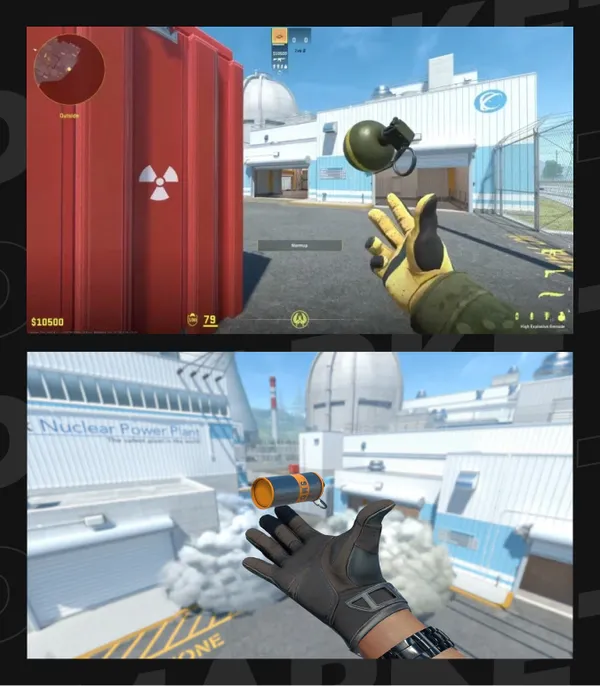
Molotov and Incendiary grenades have identical functionality: they create fire in a limited space. The main purpose of this type of CS2 grenade is to attack hiding opponents and make them go out. In some cases, players burn their health to zero, and opponents easily earn an advantage. Fire can block passageways for a short period, for example, when you need to regroup and prepare for the next attack.
Terrorist players purchase Molotov grenades. Counter-Terrorists buy Incendiary grenades, and they are more expensive, which affects the economy in CS2.
Flashbangs
Flashbangs generate a light flash and a loud sound to temporarily blind and deafen opponents before they enter a specific area. You throw one, and a sniper can’t land their one-hit bullet.
Skilled players hear or predict flashbangs and turn to a wall for a split second. It allows them to keep their vision, but quick opponents still may have an upper hand in the ensuing clash.
Flashbang forces defenders to change their positions. Attackers also should be aware of Flashbangs, as the grenade can blind them at the crucial moment of entering a bombsite.
Unlike other CS2 grenades, you can buy more than two Flashbangs to carry during a round.
Decoy Grenades
Decoy grenade is not used too often on the pro scene. Still, it may be helpful in CS2 matches. Throw it to create decisive sounds of shots and fake your real position. This tactic can be helpful to create an illusion of activity on one bombsite before rotating to another.

How to Bind Grenades in CS2
Counter-Strike 2 offers two ways for players to bind grenades. Both have the same effect: you connect a grenade type to a key and then take it to the game with one button press only.
- CS2 grenade binds via the game menu: It’s a simple method, visually intuitive.
- Console commands for grenade binds in CS2: It’s a more technical approach.
Some players prefer console commands as they can be part of CS2 launch options. Paste them in a special menu to have binds ready on a different computer or after reinstalling the game.
Let’s highlight how to bind grenades in CS2 in more detail.
CS2 Grenade Binds Via the Game Menu
- Open the settings menu: click the icon in the upper left corner.
- Head to the Keyboard/Mouse tab.
- Scroll down to the grenades and set other keys than selected by default.
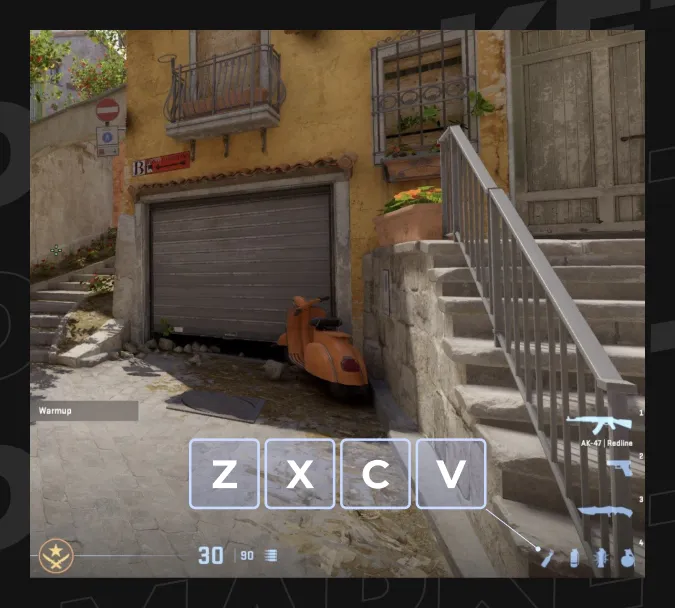
It’s pretty common practice to use Z, X, C, and V. You can assign Flashbang, Smoke, HE, and Molotov/Incendiary to them: this is the sequence for scrolling utilities, and it follows the pattern of icons in the lower right corner.
The default use for Z is Radio Message, while C and V open Chat Wheels. You may want to set other keys for the features in the game menu. However, using the voice chat is much more effective—if you know CS2 map callouts.
Console Commands for Grenade Binds in CS2
- Enable the developer console in the game settings menu.
- Press the tilde key, ~.
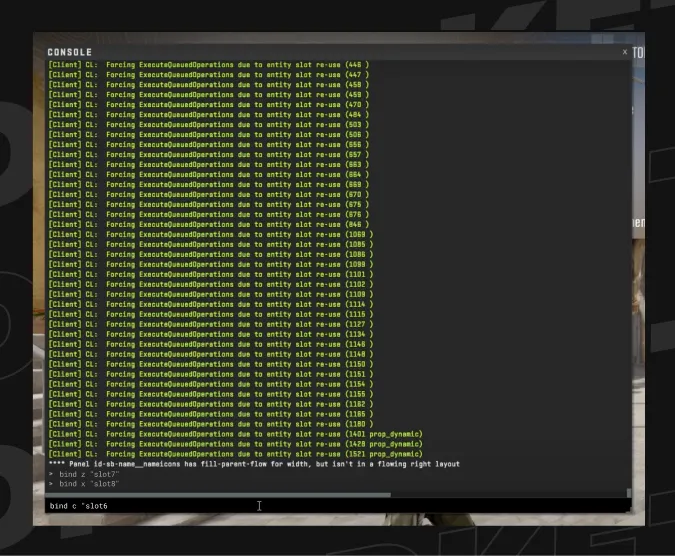
- Enter the CS2 grenade bind commands to the console. The basic pattern here is the following: bind [key] “[slot for the weapon]”
Assuming you want to bind CS2 grenades to Z, X, C, and V, here are the commands for you to use. Just copy and paste them to the developer console bind z “slot7”; bind x “slot8”; bind c “slot6”; bind v “slot10”
- slot7: Flashbang
- slot8: Smoke
- slot6: HE grenade
- slot10: Molotov/Incendiary
- slot9: Decoy. This grenade is rarely used in the game, but you can still bind it to a key of your choice.
Note: commands like bind z “use weapon_flashbang” are no longer supported in the game. CS2 console commands don’t have the ‘use weapon” one.
The Most Popular Grenades Among Players
The three most popular CS2 grenades are Smoke, Flashbang, and Molotov/Incendiary. They have a meaningful practical use in the game rounds, and specifically in team play.
HE grenades are also extremely popular. Casual players buy and use them a lot. Still, pros prefer taking Smoke if they have limited funds. Decoy can be taken only in very specific situations, like a force buy when you want to deceive your opponents.
Pro Tips for Better Grenade Usage
Grenades are an integral part of the CS2 experience, and you should learn how to be effective with them. Both beginners and professionals use utilities a lot. Beginners throw them almost chaotically; pros know what they are doing. Strive for the pro approach!
Buy Thoughtfully
It is not a good idea to fill your pockets with grenades when your money is limited. Buying HE for rounds is not a good idea, for example.
Even if you have enough money, don’t just spend it mindlessly. You can’t buy all the grenades, so use the available slots wisely.
The first thing to understand is how you are going to use your CS2 grenades.
Learn Nade Lineups
There are special spots on the Counter-Strike map where grenades should be used. You start a round, rush to one of those spots, and throw a grenade—usually Smoke.
These spots form CS2 nade lineups, and it is crucial to know them. Learn how to use grenades in CS2 for each separate map. Practice your knowledge to feel the results.
Learn Common Spots
Although nade lineups are more about the initial throws, common spots on CS2 maps are perfect for using grenades throughout a round.
The same approach goes for common passageways. You need to use smoke to close popular entrances to bombsites, otherwise the attackers will see your actions.
Learn these common spots and passageways to use CS2 grenades effectively.
Coordinate Actions with Teammates
Grenades in Counter-Strike 2 are part of the general game—and success is totally based on team actions. You can’t win alone here! Tell teammates what you buy and how you are going to use it or them.
This tip is especially valid for competitive play.
Be Creative with CS2 Nades
Repeating something you saw on YouTube is a good idea, unless you are going to do this round after round. Go online and absorb more nade lineups and common spots. Mix your actions to be unpredictable.
Also, don’t just rely on others. Think about your actions in each round and buy grenades accordingly. Coin new ideas and feel free to experiment. It’s what the best CS2 players do.
Summary
Grenades are used in CS2 for different purposes, like blocking views, forcing opponents out of a hidden spot, dealing damage, etc. The game has five grenade types, and only Decoy is generally unpopular among players.
By default, each grenade is linked to a numeric key, and it’s not really convenient to press those buttons. You can bind CS2 grenades to other keys via the game settings menu or via special console commands. This allows you to take the required grenade with just one button press.
For more Counter-Strike 2 articles and guides, stay tuned to DMarket Blog. Check out the DMarket Wiki for details on all skins and cosmetic items.