




How to Mute People in CS2: All Possible Ways
Muting teammates in Counter-Strike 2 is generally a bad idea. You absolutely need decent team communication to win matches. It is essential to reveal the positions of your opponents via voice chat, ask for assistance, and make team calls for common actions on the map. However, in some situations, knowing how to mute in CS2 is a game-saving skill.
Many (if not all) of us have been in a situation when online matchmaking has connected you with a toxic person who blames everyone for their failures. Or someone shouts unnecessarily, covering the sounds of opponents’ footsteps. Between rounds, opponents may try and ruin your confidence instead of casually chatting.
This guide on DMarket Blog explains in detail how to mute people in CS2. May no one stop you from getting XP points in the game and earning rewards from the drop system.
Mute Players in CS2 via the Scoreboard
This is the simplest way to mute in Counter-Strike 2. The tool is built into the game, and only a few actions from your side are needed to get rid of that annoying voice in your headphones.
This method is especially effective when you need to block only one person in the voice chat, not the whole team. So, here is a step-by-step guide on how to mute someone in CS2.
- While playing the game, press and hold the Tab key. The key summons the CS2 scoreboard.
- Find a player you want to mute.
- Left-click the player’s name.
- In the pop-up window, press the volume button. It will turn red, confirming the player is muted.
- The player’s name in the scoreboard should also become red.

If you need to mute more than one person, repeat the steps for a different player. To unmute someone in CS2, click their volume button in the scoreboard again.
To play CS2 with the whole opponent team muted by default or to have even your teammates muted in all matches, check out the next method. It may be better for your needs.
How to Mute in CS2 via the Game Settings Menu
Counter-Strike 2 offers many options in the settings menu. For example, you can apply optimized mouse settings and improve your aim, or implement the best CS2 settings for your perfect in-game experience. Also, it is possible to mute people from the settings. Here is how.
- Launch the game and click the gear icon in the upper left corner.
- Head to the Game tab.
- Scroll to the Communication section or click the respective tab in the upper menu.
- For the option Mute Enemy Team, choose Yes if you don’t want to hear your opponents.
- For the option Mute All But Friends, you can select Always or Only in non-competitive modes.
- Close the settings menu and enjoy CS2.
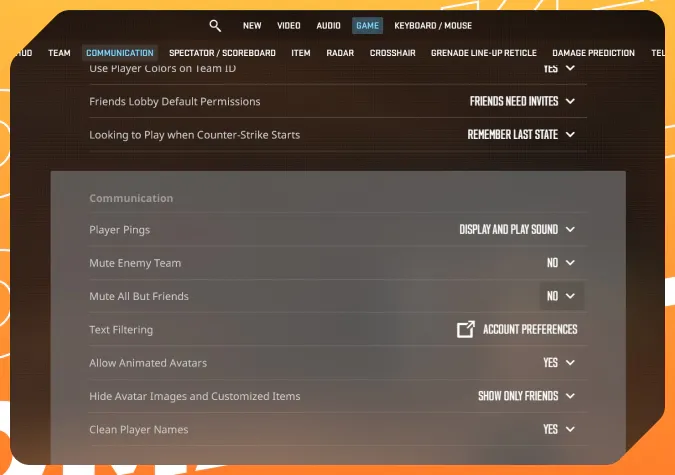
Muting the opponent team is a pretty clever step to avoid unnecessary toxicity. However, you may enjoy the level of free communication between rounds.
Even if voice chat distracts you from the game, it is not a good idea to mute your teammates in competitive or Premier CS2 modes. You certainly need good team communication to coordinate your actions. Selecting Mute All But Friends then Only in non-competitive modes is a pretty good option for this.
Adjust Voice Volume for Other Players in CS2
Yet another option may be helpful if you are not bothered by the toxicity of your teammates or opponents but only by their loud voices. Instead of muting everyone, you may decide to make them a bit quieter and thus keep effective communication.
- Open the game settings menu: click the gear icon in the upper left corner.
- Head to the Audio tab.
- Scroll to the Voice section or click the respective tab.
- Adjust the option Other Player Voice Volume. By default, it is set to 100%. Make it lower to feel comfortable in the game.
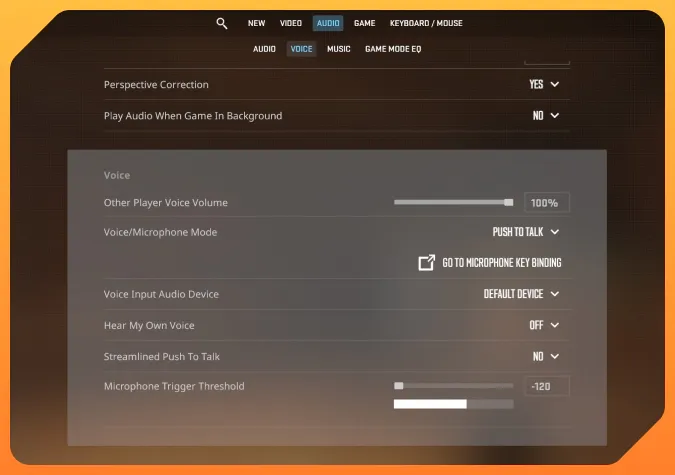
Keeping the voice chat on is generally a more effective choice. For example, you need to hear CS2 Ancient callouts when you play on this map—but with the voice volume set lower, you won’t be distracted by extra comments.
How to Mute People via the CS2 Console Commands
There are quite a few console commands in CS2, and one of them is directly connected to muting people in voice chat.
- cl_mute_enemy_team 1—enter this command in the CS2 console, and you will mute all opponents. Change the volume to 0 to unmute them: cl_mute_enemy_team 0
Some other console commands that worked in CS:GO are not compatible with CS2: voice_enable 0/1 to mute all players and ignoremsg to block all text messages.
Voice chat in CS2 is essential for effective team communication. Sometimes, people are toxic or just annoying in random online matchmaking. You can mute an individual or even everyone.
The main methods are via the scoreboard or via the game settings menu. Press Tab during a match, left-click a player’s name, and press the volume button—that’s how to mute people in CS2. Head to the Communication section of the Game settings to mute the entire enemy team or everyone except your friends.
An alternative to muting people is to lower their voice volume. You can do it in the Voice section of the Audio settings.
Some players don’t realize that there are other ways to express themselves in the game and keep voice chat for effective team communication only. You can show off your unique individuality via awesome skins and CS2 charms. Demonstrating your great skills is also better than empty words.
Trade on the go - install the mobile app of DMarket from Google Play or App Store. Never miss great prices and unique skins. The best CS2, Dota 2, Rust and TF2 marketplace is always at hand!
For many CS2 guides and articles about skins trading, stay tuned to DMarket Blog and follow DMarket on and .