




How to Change to the Left Hand In CS2
Creating the most comfortable playing environment is an important step to becoming a successful Counter-Strike player. This process includes tweaking all sorts of game settings, and holding the game weapon in your dominant hand is one of them. In this guide on DMarket Blog, we explain how to change to the left hand in CS2. The right handed is active by default.
Why is this important? Everything is strictly about your personal convenience while playing Counter-Strike. It starts with the physical world, so it is a good idea to take care of your perfect hardware and general gaming place. Then, the convenience continues into the virtual. The elements on screen or game details should not create obstacles and prevent you from demonstrating your true skills.
While all sorts of helpful adjustments can be simply taken from CS2 pro settings, the left hand feature is described in detail here.
How to Enable Left Hand in CS2
For a pretty long time, the CS2 left hand was unavailable. Only at the end of April 2024, the developers added the option for a left-handed viewmodel.
It is pretty great that you don’t need to do anything complicated for this. How to switch hands in CS2? Simply press the special button for switching between left and right hands—which is H by default.
- Start playing Counter-Strike 2.
- Press the H key on your keyboard.
- Enjoy using the left hand for the CS2 viewmodel.
- Press H again to switch to the right hand.
How to Change the Key for the CS2 Left Hand
It is possible to adjust the game settings and use a different button for switching hands in Counter-Strike 2.
The following guide explains how to change to the left hand in CS2 with your custom key.
- Launch the game
- Press the game settings icon in the top left corner of the screen
- Head to the Keyboard/Mouse section
- Scroll to the Switch Viewmodel Left/Right Hand option
- Select a key you want to use instead of the default one (H)
- Start playing Counter-Strike 2
- Press your selected CS2 left hand key
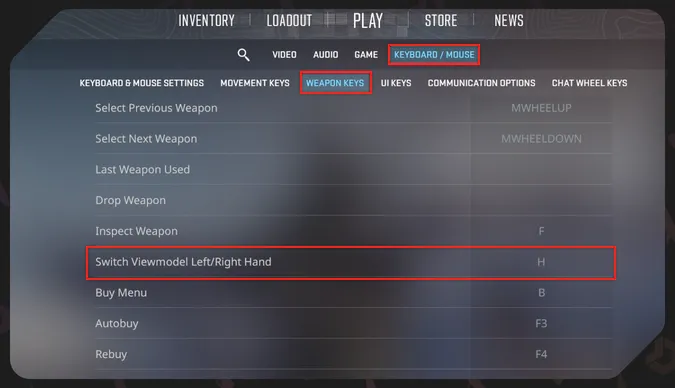
Change the key only if you use H for something else or if you have some personal preferences in this regard. Otherwise, using the default one is pretty convenient—especially considering that you don’t need to change hands for the CS2 viewmodel very often.
For other recommended CS2 settings, check out our dedicated article.
CS2 Left Hand Command
Another approach to adjusting various settings in Counter-Strike 2 is using special console commands. They can change almost anything in the game—for example, you will need them if you want to know how to 1v1 in CS2. There is also a special command for changing the viewmodel hand via the console.
First, make sure you have the developer console enabled. Head to the settings and the Game section. Scroll to the option Enable Developer Console (~) and select Yes.
- Press the tilde button (~) in the game to activate the developer console.
- Enter the CS2 hand command switchhands.
- The weapon hand changes from right to left or from left to right each time you add the switchhands command to the CS2 console.
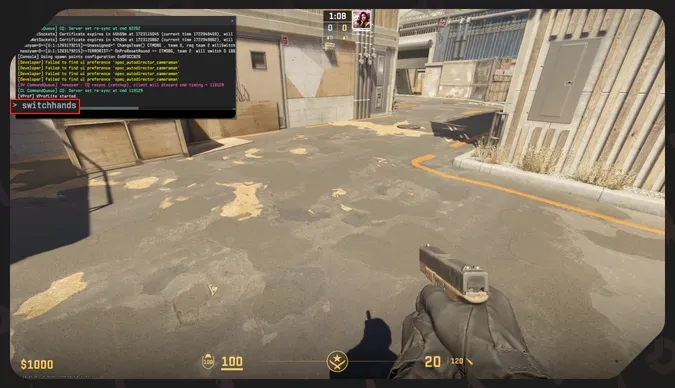
The game also has console commands for switching to indicated hands.
-
switchhandsleft—it’s the CS2 left hand command. The active weapon hand will switch to the left one.
-
switchhandsright—with this command, you activate the right weapon hand.
It is also possible to use a console command to adjust how to change to the left hand in CS2 with the usual press of a button. It binds this option to a key of your choice.
- Open the CS2 console with the tilde button (~).
- Enter the command bind “h” switchhands. Replace h with any key you want to use.
- Start playing and press the button you added to the console command to activate the CS2 left hand or switch to the right one.
The game also has console commands for switching to indicated hands.
- switchhandsleft—it’s the CS2 left hand command. The active weapon hand will switch to the left one.
- switchhandsright—with this command, you activate the right weapon hand.
It is also possible to use a console command to adjust how to change to the left hand in CS2 with the usual press of a button. It binds this option to a key of your choice.
- Open the CS2 console with the tilde button (~).
- Enter the command bind “h” switchhands. Replace h with any key you want to use.
- Start playing and press the button you added to the console command to activate the CS2 left hand or switch to the right one.
Impact on Gameplay
In general, it is a very personal setting for Counter-Strike players. If you are left-handed in real life, you may want to switch to the left hand in CS2 as well. This step makes it easier, so you have no obstacles to playing the game and improving your skills.
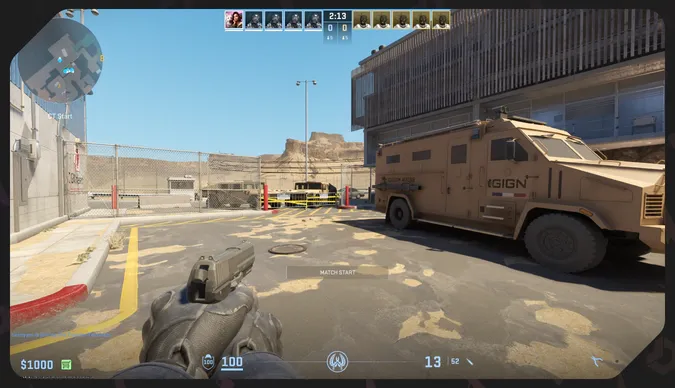
It also may look better for you. Imagine, you’ve bought the most expensive CS2 knife and can then show off with it in your left hand. A somewhat niche practical use for the CS2 left hand is for the rare moments when the viewmodel hand covers elements of the virtual world. You may look over the corner and decide to switch hands for a better view. Do it with a special button!
Note that the command bind “h” switchhands allows you to add other actions and thus bind them to the same button. It’s a rather advanced technique with the CS2 console commands.
Now that you know how to switch hands in CS2, just head to the game and start training! The idea behind using the left hand is only to remove annoying obstacles in your personal playing experience. Everything else depends on your dedication.
For other helpful materials about Counter-Strike 2, stay tuned to DMarket Blog! We also have plenty of articles on skins trading. Take a look at our Fade patterns guide to know for sure which skins in this family are rare and why they cost so much.
Trade on the go - install the mobile app of DMarket from Google Play or App Store. Never miss great prices and unique skins. The best CS2, Dota 2, Rust and TF2 marketplace is always at hand!
For more info on Counter-Strike 2 and skins trading, stay tuned to our and .