




All Crosshair Commands in CS2
There is no doubt about the importance of the crosshair in CS2. This small thing on the screen helps you shoot accurately in various dynamic situations and on different backgrounds. At the same time, the crosshair should not take too much attention, distracting players from the action.
Clear visibility but without covering the game events—it’s the biggest practical requirement of the crosshair in Counter-Strike 2. To achieve your perfect setting, adjust the appearance of your crosshair through default game settings and various helpful console commands. Both methods are described in this article on DMarket Blog, including all CS2 crosshair commands.
When to Change Your Crosshair in Counter-Strike 2
Let’s start with a basic tip.
Don’t rush to change your crosshair before actually getting decent experience in CS2.
The default crosshair is rather neutral; it suits lots of people. Play with it for a while, become accustomed to the game in general, explore the best CS2 maps, learn different weapons, and start experimenting with crosshair settings after developing some essential confidence within the game.
If you still want to adjust the CS2 crosshair super quickly, it’s actually ok. The downside here is that you most likely will need to do it again, when you have a better understanding of Counter-Strike and your needs.
CS2 Crosshair Settings
The newest game of the Counter-Strike series, CS2, took an extra step towards modern accessibility standards. More fine adjustments of various elements have been added directly to the game menu. The crosshair settings are also there.
- Open the Settings. In the CS2 main menu, click the settings icon in the upper left corner.
- In the Game section, head to the Crosshair tab.
- Explore the available options and make your adjustments.
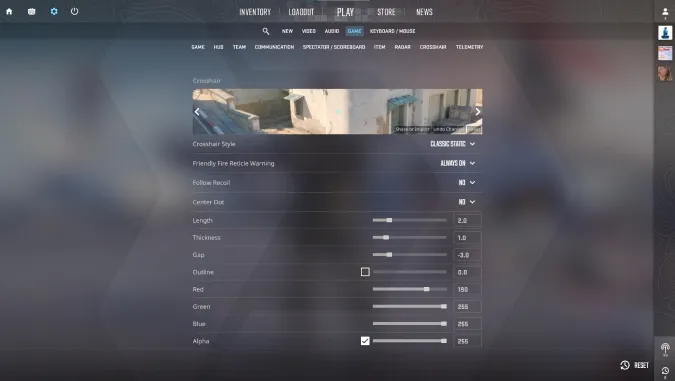
Many popular CS2 crosshair settings are here, including:
- Crosshair Style: Classic, Classic Static, Legacy
- Center Dot
- Length, Thickness, Outline
- Gap
- Color adjustments with Red, Blue, and Green
- T style
The standard menu for crosshair settings is pretty big, so take your time to explore it and make changes. Go to the game and see how your new crosshair feels in actual CS2 matches. Does it look good in combination with great CS2 skins from DMarket?
Crosshair Console Commands
However flexible the default options for adjusting the crosshair are, many players still prefer using the developer console—it’s kind of a tradition in the series.
Previously, we published a big article with the most useful CS2 console commands. Now, it’s time to focus specifically on crosshair-related ones.
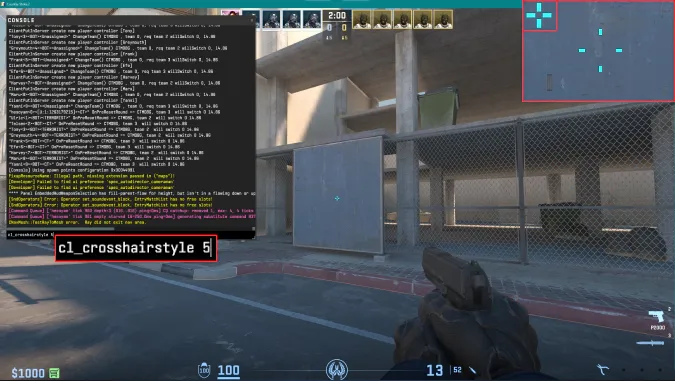
- cl_crosshairstyle [number]—to activate different crosshair styles. The values are: 0 for the default dynamic style, 1 for a static default crosshair, 2 for a classic static crosshair with dynamic dots, 3 for classic dynamic, 4 for classic static, and 5 for a mix of static and dynamic styles of the classic crosshair.
- cl_crosshaircolor [number]—choose one of four pre-installed colors of the CS2 crosshair: 0 is red, 1 is green (default), 2 is yellow, 3 is dark blue, and 4 is light blue.
- cl_crosshaircolor_r 255, cl_crosshaircolor_g 255, cl_crosshaircolor_b 255—these console commands allow players to make fine adjustments to the color of their crosshair. In such a combination, they represent the RGB color model, and you can change the amount of red, green, and blue in this mix. Using the commands separately is also possible. The value 255 is the max here; it activates the biggest color saturation.
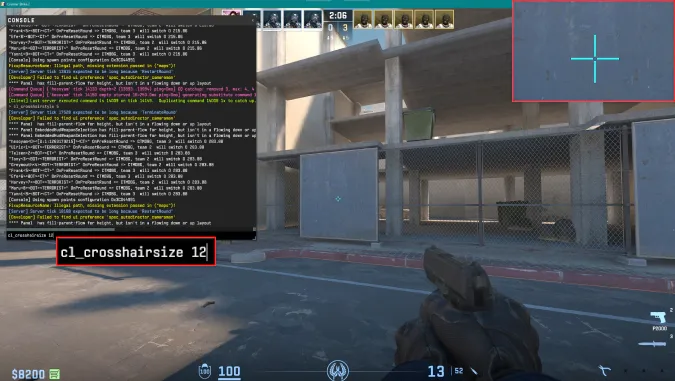
- cl_crosshairsize [size]—it’s a pretty straightforward command. It changes the crosshair size. The default value is 5, and it can be changed between the range of -20 to 20.
- cl_crosshairthickness [thickness]—it’s a command specifically for the crosshair thickness. The range of values is from -2 to 2. The default is 0.5.
- cl_crosshair_drawoutline 1—a black outline appears around the crosshair, making it more notable on the screen. Use cl_crosshair_drawoutline 0 to remove the outline.
- cl_crosshair_outlinethickness [number]—to change how thick the outline around your CS2 crosshair is. 1 is the default value here, and the possible range is from 0.1 to 3.
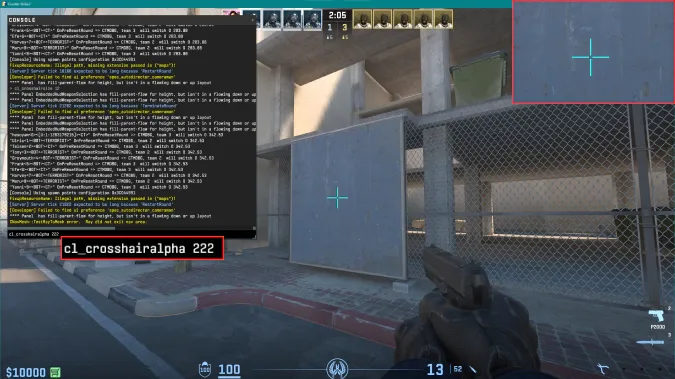
- cl_crosshairalpha [transparency]—change the transparency of your crosshair. The default value is 200, and the possible range is from 10 to 250. cl_crosshairusealpha 1 is a similar command, but it can only make the transparency stronger (1) or weaker, so the crosshair is more visible (0).
- cl_crosshairdot 1—add a dot in the middle of your CS2 crosshair. Remove it with the command cl_crosshairdot 0. Learn more about Dot crosshair here
- cl_crosshairgap [gap size]—this command changes the gap size in the middle of the crosshair. The default value is 1, and the possible range is from -10 to 10. cl_fixedcrosshairgap 3 is an alternative command with the same range of values; use it with a fixed crosshair style.
- cl_crosshairgap_useweaponvalue 1—with this command added to the console, the crosshair will be changed depending on the CS2 weapon you are using in the game. Use cl_crosshairgap_useweaponvalue 0 to turn the feature off.
- cl_crosshair_sniper_width [width]—set the width of the crosshair lines specifically for the scoped mode of sniper rifles. The value corresponds to pixels, from 0 to 20.
- crosshair 0—to remove crosshair totally. While such a step is totally weird for playing Counter-Strike, it may bring a special layer of fun to your training. crosshair 1 puts the crosshair back.
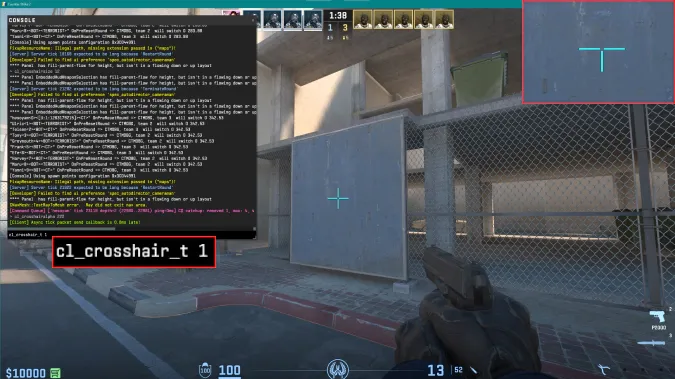
- cl_crosshair_t 1—to activate a T style of crosshair (it literally looks like a T).
- cl_crosshair_friendly_warning 1—this command activates a visual notification when you hover the crosshair over teammates, to prevent friendly fire. Use cl_crosshair_friendly_warning 0 to deactivate this feature.
- cl_observed_bot_crosshair 0—when you observe the game through bots (say after death in a training match), the crosshair will be hidden. To return it, use the command cl_observed_bot_crosshair 1.
Crosshair Settings of CS2 Professionals
An interesting opportunity regarding the CS2 crosshair is to use the settings of esports professionals. For example, you can copy commands and values for the crosshair of your favorite player, add them to the developer console, and then you have that exact crosshair in your CS2 matches.
Sounds good? Then check out this article with the best CS2 crosshair settings and codes.
The crosshair doesn’t make you a better player. When it has the best appearance, individually for you, it’s like unnecessary obstacles are removed. You simply use the crosshair as a practical tool, and your success depends on your skills (and sure, on skills of your teammates).
To really start playing the game better, check out our list of the best CS2 tips and bring the advice to your (regular and dedicated) practice.
Trade on the go - install the mobile app of DMarket from Google Play or App Store. Never miss great prices and unique skins. The best CS2, Dota 2, Rust and TF2 marketplace is always at hand!
Stay tuned to DMarket Blog for everything interesting and helpful around Counter-Strike 2 and follow us on and !