




How to Play Workshop Maps in CS2: The Ultimate Guide
Counter-Strike community maps allow players to train and have fun beyond the official maps. You sure can’t climb up the ranking ladder here, but playing CS2 Workshop maps may be a breath of fresh air for your somewhat repetitive practice routine.
In this post on DMarket Blog, we explain everything you need to know about Counter-Strike 2 Workshop maps, from how to find them to how to actually play them.
CS2 Workshop Maps: How to Find Them
Unlike the official CS2 maps, the community-created playing locations are not listed directly in the game. To find Workshop maps for Counter-Strike 2, follow these simple steps.
- Launch Steam and head to the Counter-Strike 2 store page. It’s easy to do through your library: find CS2 there and press the Store Page link right under the Play button.
- Press the Community Hub button. It’s in the upper right corner, right above the game poster.
- Head to the Workshop tab.
An alternative path to the CS2 Workshop page is the following.
- In Steam, open the Community -> Workshop tab.
- Type Counter-Strike 2 in the search bar and click the game name from the drop-down list.
- Press the Browse tab and select ‘Maps’ to see only the CS2 maps listed in the game Workshop.
All CS2 Workshop maps are here, along with other types of community-created content.

Types of Workshop Maps for Counter-Strike 2
It’s easy to get confused with the variety of community maps in the CS2 Workshop. Dividing them into categories may help you understand what you need to install and how to find these specific maps.
Here are examples of the most popular types of Workshop maps for Counter-Strike 2.
-
Aim training — as aim is the fundamental skill in CS2, you may want to install special maps to improve it. The tasks here are very different. It can be a practice with motionless dummies to warm up and learn spray patterns for different weapons. Or it can be a dynamic environment with a focus on fast reactions. Check out our selection of the best aim training maps in CS2.
-
Bhop maps — this type of community map helps CS2 players master the bunny hop technique, or bhop. You move around the map rhythmically pressing the jump button, right after each landing. This will increase your speed, which is a crucial factor in competitive matchmaking. Take a look at the top 5 CS2 bhop maps here.
-
CS2 surf maps — these Workshop maps are made for movement training. You surf on ramps and learn how to control your character in dynamic situations. While surfing itself is not part of the actual CS2 gameplay, it’s really helpful for improving your general skills. In a special article, we highlight the best CS2 surf maps, so give them a try.

These and many other practical Workshop CS2 maps can be found in the Training section through the internal sorting system. Other options here include variations of the main game modes (Wingman, Arms Race, Deathmatch, etc) and custom locations to play classic Counter-Strike. We also have an article with recommendations on the best CS2 Workshop maps.
The sorting system on the Workshop page is pretty straightforward; don’t hesitate to use it. The filters will help you see CS2 community maps for different game modes, in various art styles, for specific weapons, and those highlighting unofficial skins. It’s a good idea to pay attention to the most popular maps with four or five stars.
How to Play CS2 Workshop Maps
After finding maps you are interested in, you need to add them to your game.
-
Go to a map’s page. Click the thumbnail image or the title.
-
Map pages are similar to game pages on Steam. But instead of the Buy, Install, or Play buttons, you’ll find one there to Subscribe. Press it.

Subscribe to as many Workshop maps as you wish. Then, you need to find and launch them in Counter-Strike 2.
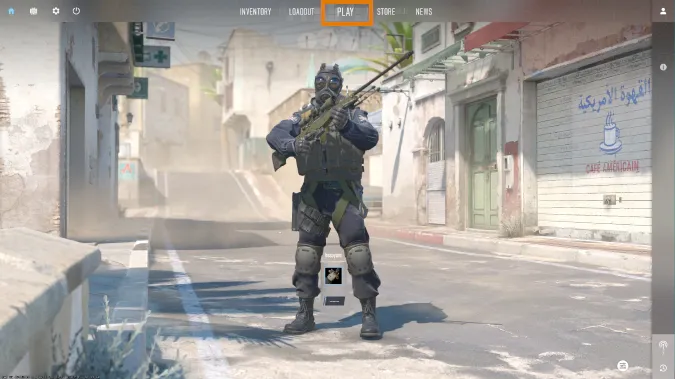
- Launch CS2
- Press the ‘Play’ button
- Click the ‘Workshop Maps’ tab
- Select a map you want to play and press Go


Trade on the go - install the mobile app of DMarket from Google Play or App Store. Never miss great prices and unique skins. The best CS2, Dota 2, and TF2 marketplace is always at hand!
Stay tuned to DMarket Blog for other helpful CS2 guides and articles and follow us on and .
更多 CS2 攻略
- My Take on Fnatic's CS2 Shake-Up: Maden In, blameF to BIG
- IEM Atlanta 2026: Half the Superstars Stayed Home and Chaos Moved In
- Rust Molotov Cocktail Guide — Crafting, Usage, and Tips
- Explore Articles About CS2 – Latest News, Guides & Insights