



Every millisecond matters in Counter-Strike 2. Whether you’re grinding in Premier or just warming up on CS2 Deathmatch, the right NVIDIA settings can drastically improve FPS, responsiveness, and visibility.
Here’s why you should care:
- Higher FPS = smoother aiming and movement.
- Lower input lag = faster reaction times.
- Better visibility = spot enemies quicker.
If you’re also tweaking your configs, check our CS2 launch options guide for additional performance gains.
How to Open the NVIDIA Control Panel
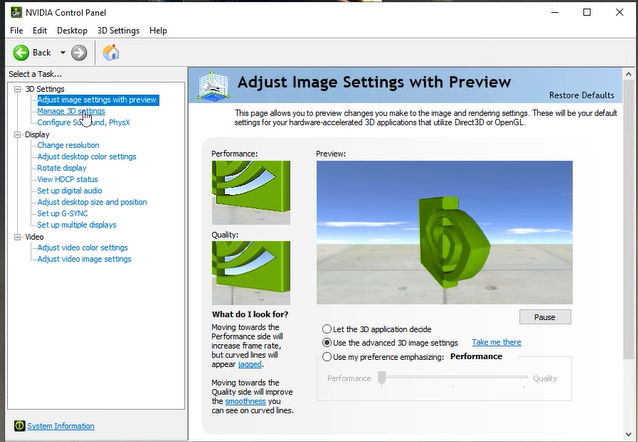
Before you begin: make sure your drivers are up to date.
- Right-click your desktop → select NVIDIA Control Panel.
- Go to Manage 3D settings.
- Under Program Settings, locate or add cs2.exe.
- Apply the changes after configuring the options below.
If you face black-screen or startup errors after applying new settings, follow this fix: CS2 Black Screen on Launch.
Best NVIDIA Control Panel Settings for CS2
| Setting | Recommended Value | Why it Helps |
| Image Scaling | Off | Prevents GPU overhead. |
| Ambient Occlusion | Off | Boosts FPS and clarity. |
| Anisotropic Filtering | Application-controlled | Lets CS2 handle filtering. |
| Antialiasing – FXAA | Off | Keeps visuals crisp. |
| Low Latency Mode | On / Ultra | Reduces input delay. |
| Power Management Mode | Prefer maximum performance | Prevents GPU downclocking. |
| Preferred Refresh Rate | Highest available | Ensures full monitor Hz usage. |
| Texture Filtering – Quality | High performance | More FPS, less GPU strain. |
| Threaded Optimization | On | Enables multi-core processing. |
| Vertical Sync (V-Sync) | Off | Minimizes input lag. |
Pro Tip: Combine these settings with CS2 Raw Input enabled in-game for the best possible mouse response.
Recommended In-Game CS2 Settings
Here’s how to align your in-game options with your Control Panel setup for maximum synergy:
- Boost Player Contrast: Enabled
- Wait for Vertical Sync: Disabled
- Anti-Aliasing: CMAA2 or 2x
- Texture Detail: Low or Medium
- Shader Detail: Low
- Particle Detail: Low
- Ambient Occlusion: Disabled
- FidelityFX Super Resolution: Disabled
- NVIDIA Reflex Low Latency: Enabled
If you’re experimenting with stretched resolutions, check out our CS2 Stretched Res guide to find what pros prefer.
Pro-Level NVIDIA Tweaks
Want to play like s1mple or ZywOo? Here are a few extra NVIDIA and monitor adjustments the pros use:
- Digital Vibrance: 70–80% for more vivid player models.
- Low Latency Mode: Ultra (for RTX 20-series and newer).
- G-Sync / FreeSync: On (if monitor supports it).
- Monitor Refresh Rate: 240Hz+ for competitive play.
- Resolution: 1280×960 (4:3 stretched) for better target visibility.
If you love experimenting with pro configs, explore setups from NiKo, ropz, and m0NESY.
Troubleshooting Common Problems
Even with perfect settings, you might run into performance issues. Here’s how to fix them:
- Low FPS or micro stutters: Check your CS2 rubberbanding fix or reduce shader detail.
- High input lag: Disable V-Sync and make sure NVIDIA Reflex is on.
- Game crashes after driver updates: Reinstall GPU drivers cleanly or verify game files.
- Screen tearing: Use G-Sync or FreeSync instead of V-Sync.
- CS2 won’t launch: Try our CS2 won’t launch fix guide.
If you want extra cash for testing new skins, you can even spawn infinite cash in practice mode using the CS2 Infinite Money command.
Quick Summary
| Setting Type | Recommended Choice | Impact |
| Low Latency Mode | On / Ultra | Major FPS & input boost |
| Texture Quality | Low | Frees GPU headroom |
| Vertical Sync | Off | Removes input delay |
| Power Management | Max performance | Stable clock speeds |
| Boost Player Contrast | Enabled | Easier to see enemies |
If you’re hosting private matches or training sessions, check how to create one with our CS2 Dedicated Server guide.
Final Tips
- Keep drivers updated (use Game Ready versions).
- Clean dust / improve airflow for consistent temps.
- Don’t use unnecessary overlays (Discord, Steam, GeForce Experience) while playing.
- For extra practice, explore CS2 Practice Commands to fine-tune your aim and recoil.
When everything’s tuned, use the CS2 FPS counter to track performance improvements after applying these NVIDIA tweaks.
Frequently Asked Questions (FAQs)
1. What’s the best NVIDIA setting for FPS in CS2?
Set Power Management Mode to “Prefer maximum performance” and Texture Filtering to “High performance.”
2. Should I turn on V-Sync in CS2?
No. V-Sync adds input lag. Instead, enable NVIDIA Reflex and G-Sync (if available).
3. Does NVIDIA Reflex work in CS2?
Yes! It reduces system latency and improves input responsiveness.
4. Why does my FPS still drop even after optimization?
Try lowering texture details and follow our CS2 Freezing fix.
5. What resolution do pros use with NVIDIA settings?
Most pros use 1280×960 (4:3 stretched). You can check examples in our CS2 Pro Settings guide.
Final Thoughts
By fine-tuning these NVIDIA Control Panel settings and pairing them with the right in-game optimizations, you’ll make CS2 run smoother, sharper, and more responsive than ever.Once you’ve applied these tweaks, practice with your improved visuals using the CS2 Grenade Cam Command or learn to Quickswitch Bind in CS2 for faster weapon swaps — small advantages that add up to better plays.