



Whether you’re chasing buttery-smooth gameplay, trying to reduce input lag, or just want to stop your GPU from overheating, knowing how to control FPS in Counter-Strike 2 (CS2) is essential.
In this guide, we’ll explain how to limit or uncap FPS in CS2, why it matters, and how it connects with other performance settings like showing FPS and 4:3 resolutions.
Why Control FPS in CS2?
FPS (frames per second) measures how many images your system renders every second.
- A higher FPS means smoother motion and lower input delay.
- A stable FPS means fewer stutters and more consistent aim.
When you cap FPS, you limit the maximum number of frames your GPU renders. When you uncap, you remove that limit entirely (fps_max 0).
When to Cap FPS
- To prevent GPU overheating or loud fan noise
- To keep gameplay stable when streaming or recording
- To match your monitor’s refresh rate (e.g. 144 Hz → fps_max 144)
- To reduce input stutter on mid-range systems
When to Uncap FPS
- You’re on a 240 Hz + monitor and want every bit of responsiveness
- You have strong hardware and don’t experience drops
- You’re practicing or testing performance
If you’re optimizing like the pros — players such as ZywOo, s1mple, or NiKo — FPS consistency is key to maintaining precise aim and spray control.
Step-by-Step: How to Cap or Uncap FPS in CS2
Step 1 — Enable Developer Console
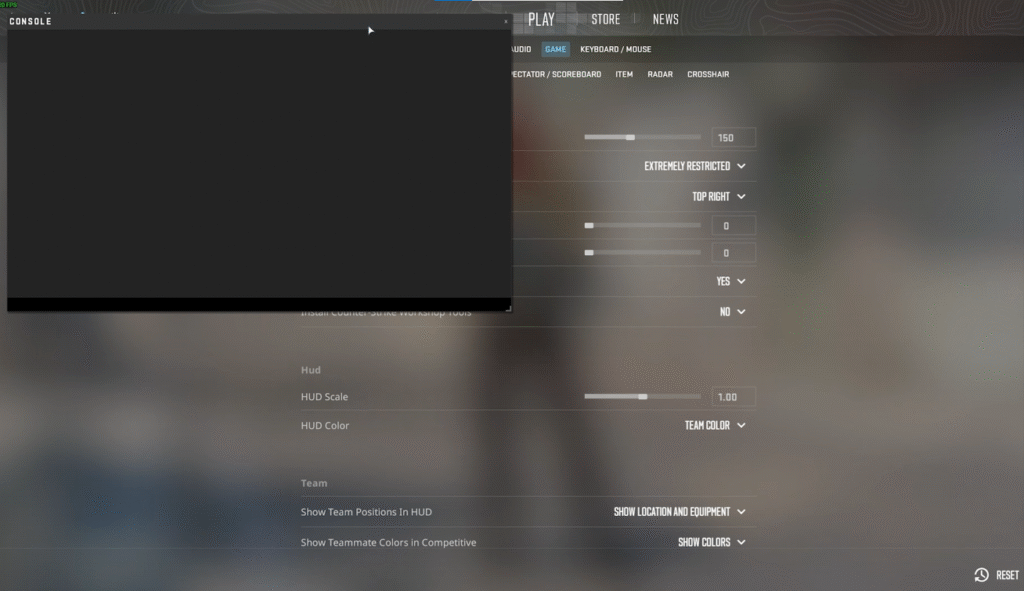
- Launch CS2
- Go to Settings → Game → Enable Developer Console = YES
- Press ~ (tilde) to open the console
Step 2 — Choose a Target FPS
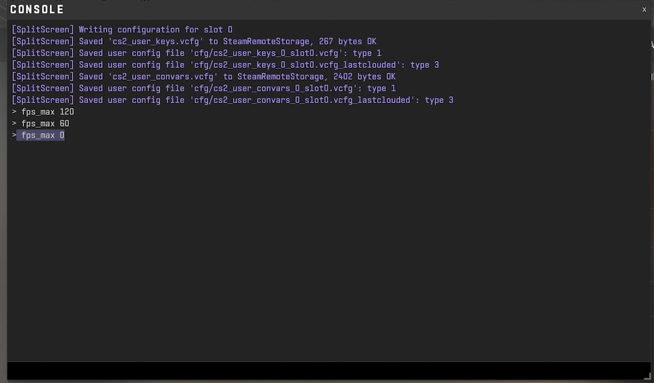
Decide if you want to cap or uncap.
- For a 144 Hz monitor → fps_max 144
- For 240 Hz → fps_max 240
- To uncap → fps_max 0
Step 3 — Apply the Command
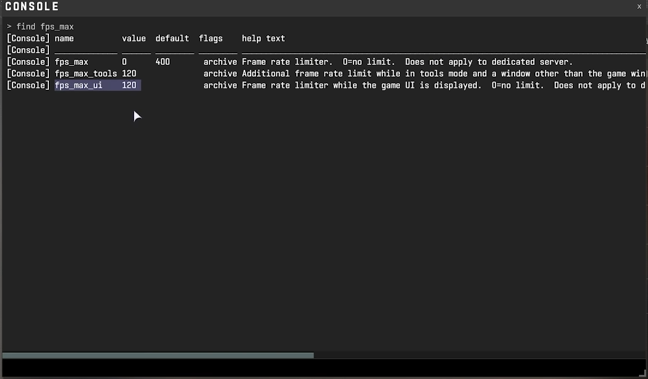
Open your console and type:
fps_max 144
or
fps_max 0
You can also use the Steam launch option:
-fps_max 240
If you’re facing launch issues, check out CS2 Launch Options for advanced parameters.
Step 4 — Verify FPS
To show FPS on-screen:
cl_showfps 1
To hide it:
cl_showfps 0
(We also have a full guide on this: How to Show FPS in CS2)
Advanced FPS Tips for Better Performance
| Tip | Benefit |
| Match FPS cap to monitor refresh rate | Smooth, stable frame timing |
| Avoid VSync in competitive matches | Prevents input delay |
| Use a high refresh monitor (144 Hz +) | Maximizes responsiveness |
| Monitor temps and GPU load | Avoids throttling and noise |
| Try CS2 Raw Input | Improves mouse accuracy |
| Combine with M4A4 Spray Pattern practice | Improves recoil control |
If you’re experiencing FPS drops, freezing, or lag spikes, see these related performance guides:
CS2 FPS Commands Cheat Sheet
| Command | Function |
| fps_max 0 | Uncaps FPS |
| fps_max <number> | Caps FPS (e.g., fps_max 144) |
| cl_showfps 1 | Shows FPS counter |
| cl_showfps 0 | Hides FPS counter |
| net_graph 1 | Shows detailed performance info |
| fps_max_menu <number> | Caps FPS in menus only |
If your FPS is still unstable, learn how to adjust your CS2 Tick Rate or explore CS2 Practice Commands to test performance in custom maps.
Troubleshooting Common FPS Issues
1. FPS locked at 60:
→ Disable VSync or G-Sync in both game and GPU panel.
2. Massive FPS drops after update:
→ Check for CS2 Freezing or background overlays (Discord, NVIDIA ShadowPlay).
3. Game stutters despite high FPS:
→ Try setting fps_max slightly below refresh rate (e.g., fps_max 140 on 144 Hz).
4. Need smoother movement in jumps or sprays:
→ Combine stable FPS with movement drills — e.g., CS2 Bhop Commands or Follow Recoil Guide.
Frequently Asked Question (FAQs)
1. How do I cap FPS in CS2?
To cap your FPS in CS2, open the console (~) and type:
fps_max 144
Replace 144 with your desired limit. You can also use fps_max_menu 120 to cap FPS in menus. For more performance tweaks, see CS2 Launch Options.
2. How do I uncap FPS in CS2?
To uncap FPS, open the console and type:
fps_max 0
This removes all FPS limits. If you’re optimizing your performance setup, also check out CS2 Raw Input for smoother mouse control.
3. What is the best FPS cap for CS2?
It depends on your monitor:
- 60 Hz: fps_max 60
- 144 Hz: fps_max 144
- 240 Hz: fps_max 240
Capping FPS slightly below your monitor refresh rate (e.g. fps_max 140 for 144 Hz) can reduce stuttering. Learn how refresh rates affect smoothness in CS2 4:3 Resolution Guide.
4. Why is my FPS stuck at 60 in CS2?
If your FPS won’t go above 60, it’s likely because VSync is enabled. Turn it off in CS2 video settings or your GPU control panel. If the issue continues, see our CS2 Freezing Fix Guide for more troubleshooting tips.
5. Does uncapping FPS reduce input lag in CS2?
Yes — uncapping FPS (fps_max 0) can slightly lower input lag and make aiming feel more responsive, especially on high refresh rate monitors. However, it may also increase GPU heat. To find your balance, pair this with CS2 Practice Commands and test your consistency.
Final Thoughts
Capping or uncapping your FPS in CS2 isn’t just about numbers — it’s about consistency.
If your system runs cool and stable, fps_max 0 (uncapped) can give you the snappiest response.
If you experience fluctuations, a reasonable cap like fps_max 144 often leads to smoother input and steadier gameplay.Pair it with the right settings, like CS2 4:3 Resolution or Best CS2 Audio Settings, to maximize your competitive edge.