




If you want to play Counter-Strike 2, unlock skins, trade items, or hop into community servers — you must have a Steam account.
This simple step-by-step guide walks you through how to create a Steam account, secure it, and prepare it for CS2. If you’re new to CS2, you may also want to explore our CS2 Beginner Guide later to get started smoothly.
What You Need Before Creating a Steam Account

Make sure you have:
- A valid email address
- A strong password
- A device for Steam Guard
- A few minutes to set everything up
If you plan on playing CS2 right after making your Steam account, check out How to Download CS2 so you can jump in instantly.
Also, for protecting your new account, knowing What Is Steam Guard is essential.
How to Create a Steam Account on PC
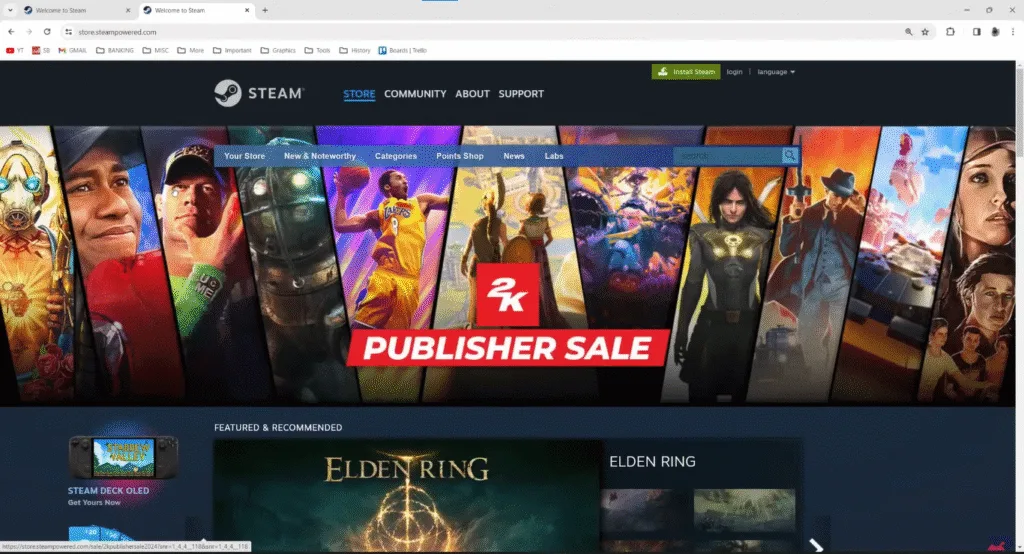
1. Visit the Official Steam Website
Go to the Steam homepage → click Login → then Join Steam.
2. Enter Your Email & Region
Steam will ask for:
- Email
- Country
- CAPTCHA
Choose an email you regularly check — it’s important for Steam Guard and for troubleshooting issues like VAC Was Unable to Verify if you ever run into it.
3. Verify Email
Steam emails you a verification code.
Copy → paste → submit.
4. Create Your Username & Password
Choose:
- Steam Account Name (unique)
- Password
- Profile name (changeable anytime)
If you’re planning to play competitive CS2, you’ll soon be exploring guides like CS2 Rank Distribution and What Is Premier CS2.
5. Install Steam
Download and install the Steam Client, then sign in.
You’re officially on Steam!
How to Create a Steam Account on Mobile
1. Download the Steam App
2. Tap Create Account
Enter your email → verify it.
3. (Recommended) Add Your Phone Number
This improves security and helps if you ever want to trade or fix issues like Some of Your Game Files Have Been Detected CS2.
4. Choose Your Username & Password
Finish the process and log in.
Steam Account Security Tips for CS2 Players
CS2 skins have real value, which means scammers target new users.
Here’s how to protect your account:
1. Enable Steam Guard Mobile Authenticator
This is your strongest protection. Also helps avoid trade delays when learning How to Remove Trade Hold on Steam.
2. Learn About API Scams
Read the API Scam guide so you never lose your CS2 skins.
3. Never Install Cheats
Cheats = risk of bans + risk of account theft.
What to Do After Creating Your Steam Account
Once your account is ready, here’s what to do next:
Download CS2
Use the How to Download CS2 guide for quick setup.
Learn the Maps
You’ll need callouts once you hop into ranked. Try:
Set Up Your Crosshair & Settings
Use:
Understand Ranking
Check:
Learn Trading Basics
Start here: Steam Trade URL Guide
Know the Weapon Meta
Quick Requirements Table
| Requirement | Needed? | Notes |
| ✔ | Must verify | |
| Password | ✔ | Use something strong |
| Phone | Optional | Helps with trading & recovery |
| Steam Client | ✔ | Required to play CS2 |
| Steam Guard | Highly recommended | Prevents scams & hijacks |
Troubleshooting Steam Account Creation Issues
1. Not Receiving Email Verification
Try:
- Checking spam
- Waiting a few minutes
- Using a different provider
2. Username Is Already Taken
Add numbers, underscores, or shorten your gamertag.
3. Login Loop
Restart browser or Steam.
4. Can’t Log In After Creating an Account
Double-check your two-factor authentication.
Once you’re in-game, if you run into issues like CS2 Black Screen on Launch or CS2 Won’t Launch, the blog has full fix guides.
Frequently Asked Questions (FAQs)
1. Do I need a Steam account to play CS2?
Yes. CS2 is fully tied to Steam, so you must create a Steam account to download, launch, play, and save your game settings.
2. Is creating a Steam account free?
Absolutely. Making a Steam account is 100% free, and you can use it to play free games like CS2, manage your inventory, and join community servers.
3. Why am I not receiving the Steam verification email?
Check your spam folder, wait 2–5 minutes, and ensure you entered the correct email address. If it still doesn’t arrive, try using a different email provider.
4. Do I need a phone number to create a Steam account?
No, it’s optional — but highly recommended for Steam Guard security and removing trade holds later.
5. Can I change my Steam username later?
You can change your profile name anytime, but your Steam Account Name (the login name) is permanent once created.
Final Thoughts
Creating a Steam account only takes a couple of minutes, but setting it up right ensures a smooth CS2 experience — especially when ranking up, trading skins, or joining community servers.
With your Steam account created, you’re now ready to:
- Play and rank up in CS2
- Learn smokes, callouts, and recoil
- Trade skins safely
- Explore the entire CS2 meta
Welcome to Steam — time to queue up!