




Where Are Steam Screenshots Saved? (Quick Answer)
Steam saves your screenshots in two places:
- On your PC: a local folder inside userdata
- Inside Steam: via the built-in Screenshot Manager
Below, I’ll show you exactly where the folder is, how to open it instantly, and how to change it if you want things more organized.
Screenshots matter a lot — especially when you’re showing off a clean ace in CS2, your newest unbox from knife cases in CS2 or exploring cool custom workshop maps. So knowing where they go is essential.
How to Find Your Steam Screenshot Folder (Instant Path)
Method 1 — Use Steam’s Screenshot Manager (Fastest)
- Open Steam
- Click View in the top menu
- Select Screenshots
- Choose the game (e.g., Counter-Strike 2)
- Click Show on Disk
This opens the exact folder instantly.
If you mostly play CS2 and want to review highlights for improving your mechanics, check out:
CS2 Follow Recoil Guide
Method 2 — Find Steam Screenshot Folder Manually (Windows)
Default Path (Windows)
C:\Program Files (x86)\Steam\userdata\<YOUR_STEAM_ID>\760\remote\<GAME_ID>\screenshots
- YOUR_STEAM_ID = your Steam numeric ID
- GAME_ID = Steam’s app number (CS2 = 730)
Examples:
- CS2 screenshots → …\730\screenshots
- Dota 2 screenshots → …\570\screenshots
If you’re also tweaking game settings and configs, you may want to explore:
CS2 config commands & binds
Method 3 — Use Steam Shortcut Key (F12)
Press F12 to take a screenshot.
After that, a popup appears → click View Screenshot → then Show on Disk.
If your screenshots don’t appear or F12 isn’t working, it might be due to issues similar to:
CS2 Black Screen on Launch
Where Are Steam Screenshots Saved on Mobile?
Steam Mobile does NOT save screenshots locally.
It only uploads screenshots you capture on PC to your Steam Cloud.
You can view them here:
- Steam App → You & Friends
- Screenshots
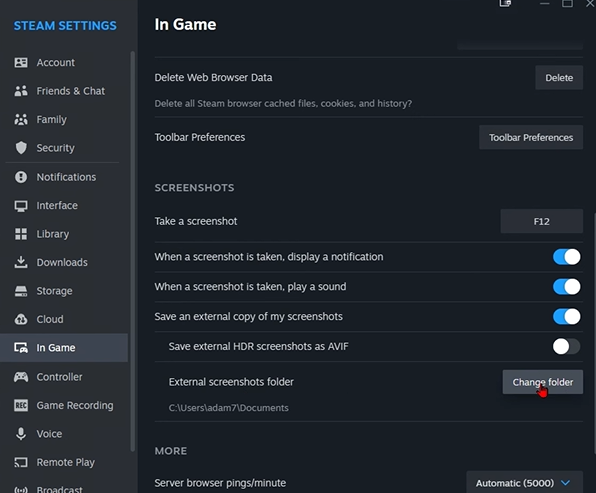
How to Change Steam Screenshot Folder
Steam doesn’t allow changing the screenshot folder globally.
BUT you can change the location of where screenshots go after you upload them:
- Go to Steam > Settings
- Open In-Game
- Change the Screenshot Shortcut Keys
- Choose a custom folder for Save an uncompressed copy
This is useful when you want uncompressed CS2 highlights for montages or guides like:
How to Fast Forward CS2 Replays
How to Backup Your Steam Screenshots
You can safely copy the entire folder:
…\userdata\<YOUR_STEAM_ID>\760\
Backing them up is smart—especially if you record clutch moments, rare openings, or skins like butterfly knives using:
CS2 Cases With Butterfly Knife
Frequently Asked Questions (FAQs)
1. Where do Steam screenshots go?
They are saved inside:
Steam\userdata\<SteamID>\760\remote\<GameID>\screenshots
2. Where are Steam screenshots saved for CS2?
For CS2:
…\userdata\<SteamID>\760\remote\730\screenshots
3. Why don’t my Steam screenshots appear?
Possible causes:
- Wrong SteamID folder
- Wrong GameID folder
- Steam Cloud disabled
- Hotkey changed
For CS2-specific bugs, also check:
CS2 Crashing Fix
4. How do I view screenshots inside Steam?
Use:
Steam > View > Screenshots > Show on Disk