



Why Your Mic Matters in Counter-Strike
In Counter-Strike, clear voice communication wins games. Whether you’re calling Mirage smokes, clutching a 1v2, or coordinating a rush, bad mic settings can ruin team play.
Many players struggle because Counter-Strike doesn’t always auto-detect the correct microphone — especially if you use:
- USB headsets
- External XLR mics
- Virtual audio devices
Let’s fix that properly.
How to Change Mic in CSGO (In-Game Method)
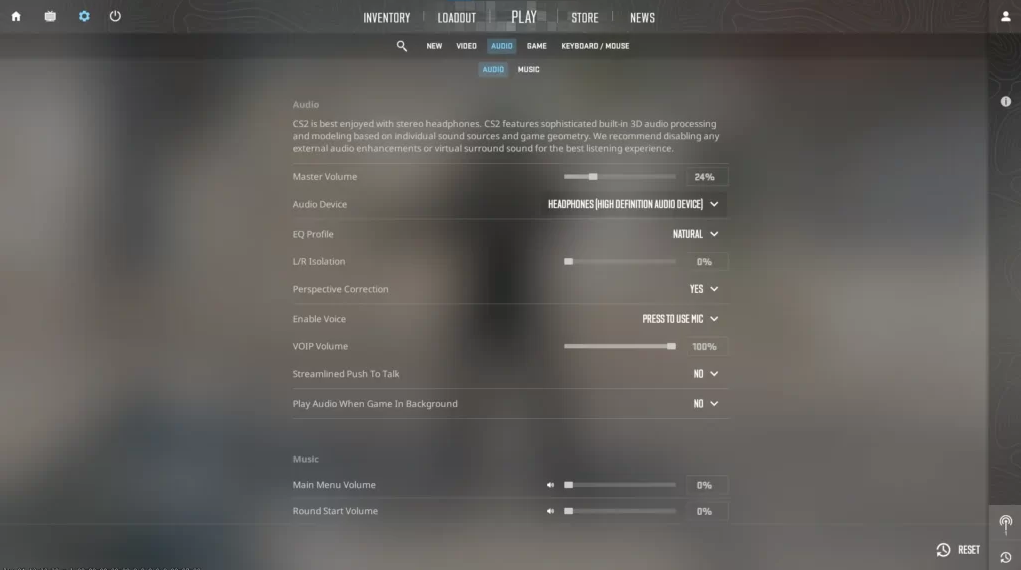
This is the fastest and safest way.
Step-by-Step:
- Launch CSGO / CS2
- Open Settings → Audio
- Find Audio Input Device
- Select your correct microphone
- Click Apply Changes
Speak into your mic and watch the input bar move. If it reacts, you’re good.
If teammates still can’t hear you, continue below.
How to Change Mic Using Steam Settings (Recommended)
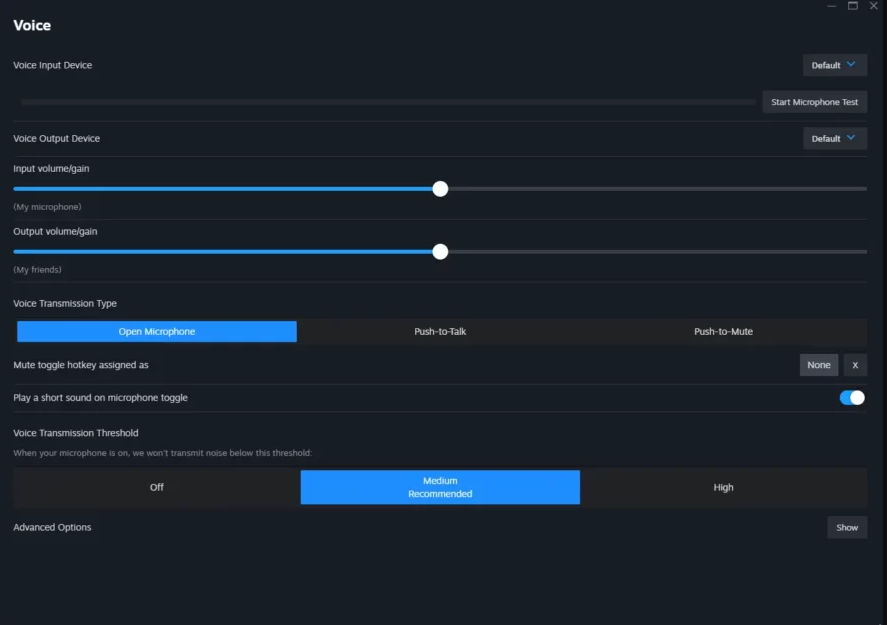
Steam overrides in-game audio — so this step is crucial.
Steps:
- Open Steam
- Go to Settings → Voice
- Set your Input Device (microphone)
- Disable automatic volume control
- Test mic input
Restart CS after applying changes.
Fix Mic Not Working in CS2 (Common Causes)
If your mic still doesn’t work, it’s usually one of these:
1. Wrong Default Mic in Windows
- Open Sound Settings
- Set correct mic as Default Input
2. Push-to-Talk Key Not Working
Your counter strike mic key might be unbound.
Go to: Settings → Keyboard / Mouse → Communication
Default key: K
You can rebind it anytime.
If you’re experimenting with keybinds, our CS2 Binds guide is helpful here.
Best CS2 Mic Settings (Recommended)
Here are clean CS2 mic settings that most competitive players use:
| Setting | Recommended Value |
| Voice Enable | On |
| Push-to-Talk | On |
| VOIP Volume | 70–80% |
| Mic Threshold | Low |
| Audio Input | Correct mic |
These settings balance clarity without distortion.
For full sound optimization, check Best CS2 Audio Settings.
Console Commands to Test Your Mic
Open console (~) and use:
voice_enable 1
voice_loopback 1
Speak — you should hear yourself.
Turn it off after testing:
voice_loopback 0
Why Teammates Can’t Hear You (Quick Checklist)
- Mic muted in Windows
- Wrong Steam input device
- Push-to-talk key unbound
- Voice chat disabled
- Game not restarted after changes
Still stuck? See CS2 Mic Not Working for advanced fixes.
Pro Player Mic & Audio Habits
Most pros keep mic setup simple:
- Push-to-talk only
- No background noise suppression
- Stable volume
If you’re curious how top players configure their setups, explore:
- s1mple CS2 Settings
- m0NESY CS2 Settings
- ZywOo CS2 Settings
Frequently Asked Questions (FAQs)
Why does CS2 not detect my mic?
Usually because Steam or Windows is using a different default input.
Can I use multiple mics?
Yes, but only one can be active at a time in Steam settings.
What is the default mic key in Counter-Strike?
The default push-to-talk key is K.
Should I use voice activation?
Push-to-talk is always better for competitive play.
Final Thoughts
Learning how to change mic in CSGO and CS2 is mandatory if you want smooth communication and fewer team arguments. Most issues come from Steam or Windows — not the game itself.
Once your mic is set correctly, you’ll notice:
- Clearer callouts
- Faster reactions
- Better team coordination
Fix it once, forget about it forever.