



Steam Library Sharing is one of those features every gamer hears about but few actually use properly. Whether you want to let a friend try CS2, share your single-player games with family, or manage multiple PCs, this guide will walk you through exactly how Steam library sharing works, its limitations, and how to avoid common mistakes.
What Is Steam Library Sharing?

Steam Library Sharing (officially called Steam Family Sharing) lets you share your Steam game library with other accounts on the same computer—or authorized computers—without giving away your login details.
In simple terms:
- Your friend or family member can play your games
- You keep full ownership
- Your inventory, skins, and progress stay safe
This is especially useful if someone wants to try Counter-Strike 2 before committing time or money.
Steam How to Share Library (Step-by-Step)
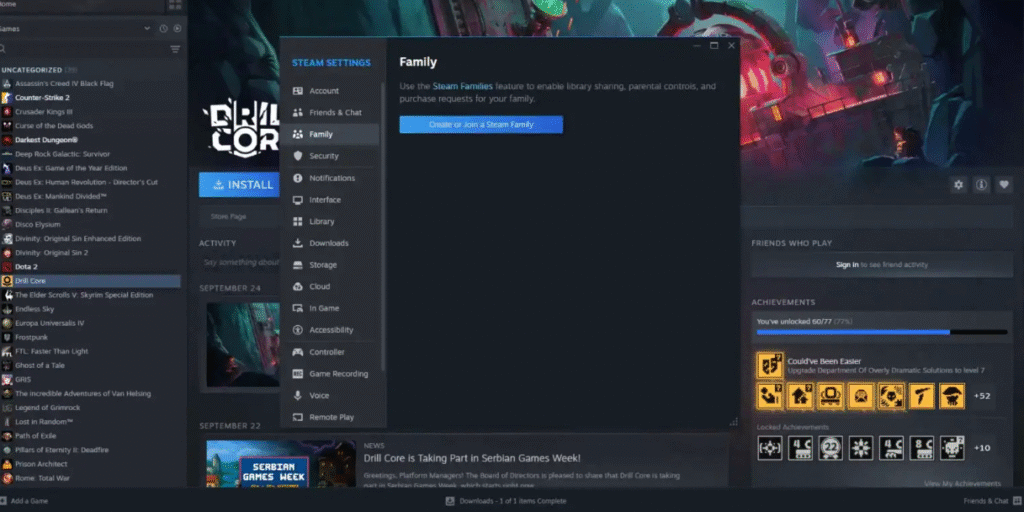
Here’s the safest and most reliable way to share Steam library with someone:
Step 1: Log Into Your Steam Account on Their PC
- Open Steam
- Sign in only once on the device you want to authorize
- Make sure Steam Guard is enabled
Tip: Never disable Steam Guard—it’s essential for account security.
Step 2: Enable Steam Library Sharing
- Open Steam
- Go to Settings
- Click Family
- Check “Authorize Library Sharing on this device”
- Select the accounts you want to share with
- Log out
Step 3: They Log In and Access Your Games
Once enabled:
- Your games appear in their Steam library
- Downloading works normally
- Achievements are saved to their account
That’s it—you’ve successfully set up steam library sharing.
Steam Library Sharing Rules You MUST Know
Before sharing your games, understand these key limitations:
| Rule | Explanation |
| One user at a time | If you start a game, they get kicked |
| Online-only check | Steam must be online |
| Not all games supported | Some publishers disable sharing |
| No shared DLC ownership | DLC only works if the owner owns the base game |
For CS2 players, this means:
- Only one person can play CS2 at a time
- Prime status is not shared
- Skins remain locked to the owner
Can You Share CS2 Using Steam Library Sharing?
Yes—but with limits.
CS2 itself is free-to-play, but sharing is still useful for:
- Testing Prime-locked features
- Trying community servers
- Practicing on custom maps
If you’re into custom content, check out our guide on
CS2 Custom Maps
What Happens to Skins, Cases & Inventory?
This is a big concern for CS players.
- Skins are not shared
- Cases cannot be opened by shared users
- Steam inventory stays private and secure
- Game access only
If you’re curious about CS2 cases and knives, these guides pair well with library sharing:
- Knife Cases in CS2
- CS2 Cases With Butterfly Knife
Steam Library Sharing Not Working? Try These Fixes
If steam library share isn’t working, try the following:
Quick Fix Checklist
- Restart Steam on both accounts
- Make sure Steam Guard is enabled
- Re-authorize the device
- Log out and back in
- Ensure the owner is not playing a game
Common Error Explained
“This game is currently unavailable”
- The owner is playing another game
- The game doesn’t support sharing
- Steam servers are temporarily offline
Steam Library Sharing vs Family View
Many gamers confuse these two features:
| Feature | Purpose |
| Library Sharing | Share games |
| Family View | Restrict access & purchases |
They work best together if you’re sharing with kids or siblings.
Is Steam Library Sharing Safe?
Yes—if used correctly.
Best practices:
- Share only with people you trust
- Never share your password
- Keep Steam Guard enabled
- Avoid public or cyber café PCs
For more account safety tips, you might find this useful:
How to Avoid Common Steam Scams
Best Use Cases for Steam Library Sharing
Steam library sharing makes the most sense when:
- A friend wants to test CS2 seriously
- You own multiple PCs
- Family members game casually
- You want to try paid games before buying
Final Thoughts
Steam Library Sharing is an underrated feature that—when used correctly—can save money, improve accessibility, and make gaming more social. For CS2 players, it’s a great way to introduce friends to the ecosystem without risking your account or inventory.
If you’re building your CS2 setup or improving gameplay, consider exploring:
Used responsibly, sharing your Steam library is safe, simple, and incredibly useful.
Frequently Asked Questions (FAQs)
Can two people play shared games at the same time?
No. Only one user can access the library at once.
Does Steam library sharing share Prime in CS2?
No. Prime status is account-based.
Can shared users get VAC banned?
Yes—but the ban applies to the user’s account, not yours.
Is Steam library sharing free?
Yes. It’s a built-in Steam feature.