




Ropz’s Settings in CS2: From Crosshair to Monitor Settings
Robin “ropz” Kool is one of the best Counter-Strike players of all time. His success includes a variety of prestigious trophies and absolutely mind-blowing skills within the game. Using ropz’s CS2 settings for your personal experience is certainly a good idea—to feel the pro balance and then adjust it for your unique preferences.
In terms of team roles, ropz is a lurker. His mission is to be stealthy in rotations, find advantageous positioning for individual frags, and get info for team actions. The player is one of the most dangerous opponents in clutch situations, as ropz understands the game and the mentality of his opponents very well.
Many people in the CS2 community admire the technical and systematic approach of ropz. Instead of chaos, he brings thought-out strategies into each round. The shot accuracy by ropz is legendary, as well as his movement: CS2 settings are the basis for developing such skills.
Ropz’s Settings in CS2
One of the key features of ropz’s playstyle in CS2 is pixel-perfect shots: mouse and crosshair settings are very important for this.
Among all the other roles in CS2, lurkers should be very efficient in receiving all sorts of info from the in-game HUD elements, including radar settings.
Mouse Settings
We can note some interesting details for the CS2 mouse settings of ropz. Compared to his Vitality teammate, ZywOo, ropz has a slightly lower sensitivity: 708 eDPI instead of 800 in ZywOo’s settings.
The Hz option, or the times per second the mouse reports its position to the PC, is significantly higher: 2000 instead of 1000. This may help ropz increase his accuracy from tricky angles.
- Mouse: Razer DeathAdder V3 HyperSpeed
- DPI: 400
- Sensitivity: 1.77
- eDPI: 708
- Zoom Sensitivity: 1
- Hz: 2000
- Windows Sensitivity: 6
Video Settings: Performance and Visibility
This section highlights CS2 ropz’s settings for in-game video. On one hand, they affect the general performance of Counter-Strike as software. Still, for pro players, visibility is more important. Video settings should allow ropz to quickly notice his CS2 opponents and be the first to take action in all sorts of situations.
- Resolution: 1920x1080
- Aspect Ratio: 16:9
- Scaling Mode: Native
- Brightness: 93%
- Display Mode: Fullscreen
In the Advanced section of ropz’s video settings, we can see mainly a lowered quality of the image. Effectiveness is prioritized over visual beauty.
- Boost Player Contrast: Enabled
- V-Sync: Disabled
- *Maximum FPS In Game: 999
- Multisampling Anti-Aliasing Mode: 4x MSAA
- Global Shadow Quality: Low
- Dynamic Shadows: All
- Mode/Texture Detail: Low
- Texture Filtering Mode: Bilinear
- Shader Detail: Low
- Particle Detail: Low
- Ambient Occlusion: Medium
- High Dynamic Range: Quality
- FidelityFX Super Resolution: Disabled (Highest Quality)
- NVIDIA Reflex Low Latency: Enabled
- NVIDIA G-Sync: Disabled
Crosshair Settings and Code
Although the crosshair look often leans towards personal aesthetic preferences, this part of the settings is also very practical. The crosshair should be nicely visible on all the best CS2 maps. Here is what ropz prefers to have in his matches.
- ropz’s crosshair code: CSGO-MMQuh-Hs3Sj-Qv9zd-VaCmc-3QqNO
- Style: Classic Static
- Follow Recoil: No
- Dot: No
- Length: 2
- Thickness: 0.5
- Gap: -3
- Outline: No
- Color: Green
- Red: 50
- Green: 250
- Blue: 154
- Alpha: Yes
- Alpha Value: 255
- T-Style: No
- Deployed Weapon Gap: No
- Sniper Width: 0
Viewmodel Settings
The viewmodel settings of ropz are quite universal among CS2 professionals.
You can use the following console commands to adjust your viewmodel quickly:
*viewmodel_fov 68; viewmodel_offset_x 2.5; viewmodel_offset_y 0; viewmodel_offset_z -1.5; viewmodel_presetpos 2*.
- FOV: 68
- Offset X: 2.5
- Offset Y: 0
- Offset Z: -1.5
- Presetpos: 2
HUD Preferences
Here are the HUD settings ropz uses in CS2.
- HUD Scale: 1
- HUD Color: Team Color
Radar Settings
As for CS2 radar settings, ropz makes the map zoom somewhat lower than that of other players. He disables toggling the shape while the scoreboard is on the screen.
- Radar Centers The Player: Yes
- Radar Is Rotating: Yes
- Radar HUD Size: 1
- Radar Map Zoom: 0.65
- Toggle Shape With Scoreboard: No
Monitor Settings
We all play Counter-Strike on different monitors, but the settings can be universal across brands and models. Check out what you can take for your game from CS2 ropz’s settings.
- Monitor: ZOWIE XL2586K+
- DyAc 2: Premium
- Black eQualizer: 1
- Color Vibrance: 14
- Low Blue Light: 0
- Picture Mode: Standard
- Brightness: 50
- Contrast: 35
- Sharpness: 7
- Gamma: Gamma 5
- Color Temperature: Normal
- AMA: High
Equipment Setup
It certainly feels great to have pro gaming equipment. Here is what ropz uses during CS2 tournaments.
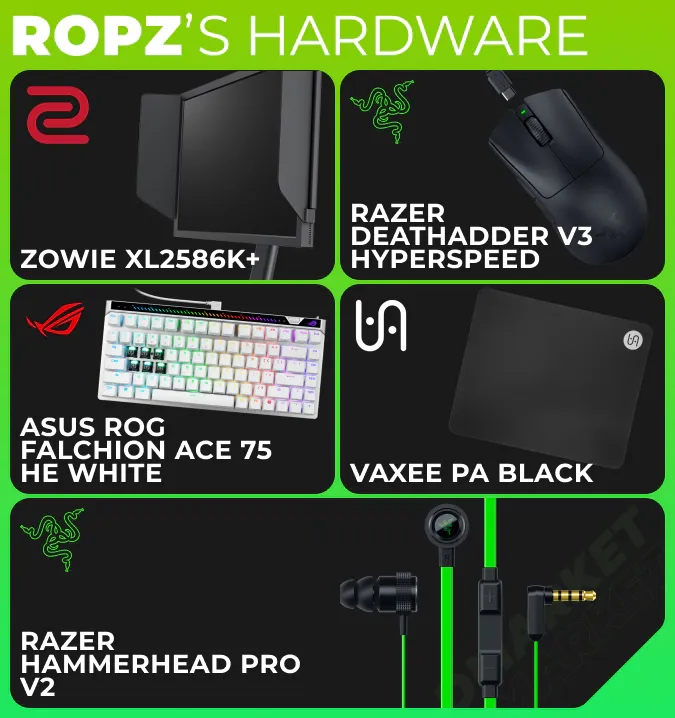
- Monitor: ZOWIE XL2586K+
- Mouse: Razer DeathAdder V3 HyperSpeed
- Keyboard: ASUS ROG Falchion Ace 75 HE White
- Mousepad: VAXEE PA Black
- Headset: SteelSeries Arctis Nova Pro Wireless
- Earphones: Razer Hammerhead Pro V2
How to Apply ropz’s Settings in CS2
It’s super easy to take ropz’s setting to your game.
- Copy the crosshair code from our article and paste it to the special section in the settings menu.
- Copy the viewmodel commands and add them to the developer console.
- Every option can be added manually via the game settings menu. Click the gear icon in the upper left corner and then adjust all the available values accordingly.
How ropz’s Settings Compare to Other Pros
There are no substantial differences in ropz’s preferences if we compare them to the settings of other CS2 esports players. There are some slight tweaks here and there, which reflect the personality of ropz—and you may need to add your own unique touch for the best experience.
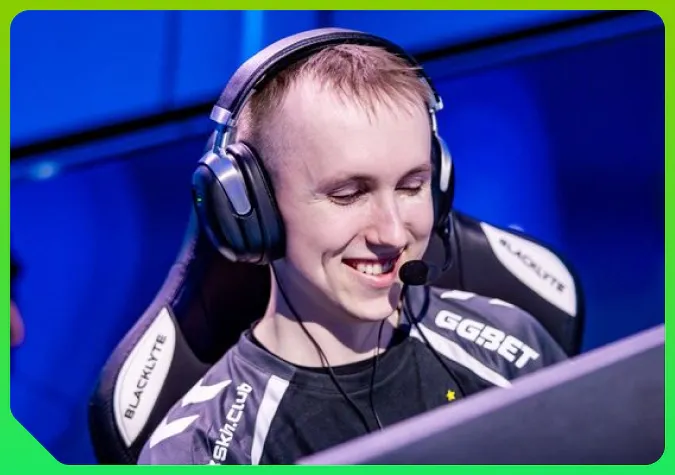
One big thing to note is that ropz follows more modern trends in the video settings. In NiKo’s settings, we can see the old-school tradition of a low resolution and a stretched image. Ropz goes for the proper Full HD.
CS2 ropz’s settings reflect the core nature of this player: effectiveness in the game and technical proficiency. This playing environment is a very good starting point for training and competitive matches. Use it to focus on developing skills and on the joy of Counter-Strike.
Trade on the go - install the mobile app of DMarket from Google Play or App Store. Never miss great prices and unique skins. The best CS2, Dota 2, Rust and TF2 marketplace is always at hand!