




CS2 Interp Settings Guide
Playing Counter-Strike 2 with the default settings is good enough for beginners. You need to get basic experience to actually feel what changes you need to achieve better results in the game. Moreover, a beginner’s skills may not be enough for adjustments to the settings to make any positive difference.
Technical details, such as the CS2 Interp settings, play their role only when you know the maps well, can aim properly with a variety of weapons, and react quickly to your opponents’ actions. Have you reached this level already? Then this guide on Interpolation in CS2 may give you important information. Check out how to reduce lag, latency, and become a better Counter-Strike player!
It is also worth understanding that changing the CS2 Interpolation setting is not a magic wand that solves any connection issues. This is a bigger puzzle, and the other elements include the power of your gaming hardware and the quality of your internet connection. Still, optimized CS2 Interp settings may substantially improve your experience.
What is Interpolation in CS2?
Interpolation in CS2 and other shooters is a technology that allows the game to remove gaps caused by the data exchange process between a player’s PC and the server. As a result, gamers get smooth actions, instead of a weird slide show.
The synchronization between the server and the client (your PC) happens with certain “steps”, even if they are really small—just a fraction of a second. For example, a game character runs in a certain direction. At some moment, the server sees him at point A. The next moment, the character is already at point B. Interpolation causes a very small delay to remove the gaps between these points and fill them with proper animations on your screen.
Interpolation is essential for ensuring a seamless experience in CS2 for people in various physical locations and with different hardware.
How Interp Settings Work
The key setting for CS2 Interpolation is the time of delay. The Interpolation Time can be increased or decreased via the developer console.
It may happen that you see “outdated” game actions with high CS2 Interp time. You see an opponent right in the scope of your sniper rifle. You shoot, but nothing happens. The guy magically “teleports” to another spot and shoots you instead.
In such a fast-paced game as Counter-Strike 2, each and every delay may bring disaster. A single bullet can decide the outcome of a duel, a round, or even a match. Issues with CS2 Interpolation Time are reflected with lag and latency on your side, so the game feels unresponsive and sluggish. You can experience this in all CS2 game modes and it can lead to a drop in rank or a slowing of progress.
On the other hand, if your CS2 Interp settings are nicely optimized, you just play the game, have fun, and win matches without annoying technical glitches—just as it should be.

Default Interp Settings in CS2
The default Interp settings in CS2 have been created to make the delay equal to 0.31ms (cl_interp 0.03125). It’s a very good basic value that guarantees a smooth experience on good hardware with a decent internet connection. There is no need to change the CS2 Interp settings if you do not experience lag and latency. These cause desynchronization between the image you see on screen and the actions that are happening.
The issues may be caused by a variety of factors. For instance, the bare difference in hardware and the connection quality between all the players in a match may increase the Interpolation Time.
Optimizing Interp Settings
If you’ve decided to try and optimize your CS2 Interp settings, here is a step-by-step guide on how to do so. Also, you’ll find the recommended settings in this section.
Interpolation Console Commands
These three console commands directly affect Interpolation Time in Counter-Strike.
- cl_updaterate 128—it reduces the gaps between data exchange, making your PC and the game server connect and exchange info on the current state more often. This command itself may be enough to remove lag and latency in CS2.
- cl_interp_ratio 1—it’s a technical command that gives a high priority to the following one, cl_interp.
- cl_interp 0.015625—the Interpolation Time (delay) is set to around 0.15ms with this command, which is great for most situations.
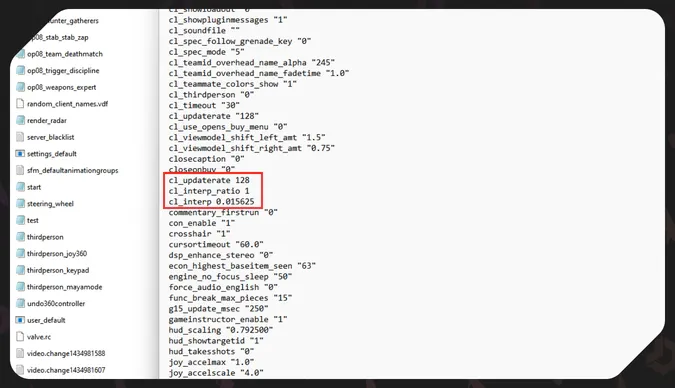
Autoexec with CS2 Interp Settings
To add these settings to your Counter-Strike 2 game, you need to create a dedicated autoexec file or add the Interp CS2 commands to your existing one.
- Create an empty .txt doc and save it to the /cfg folder with the file name autoexec.cfg. The path to this folder is the following: Program Files (x86)\Steam\steamapps\common\Counter-Strike Global Offensive\game\csgo\cfg.
- Add the CS2 Interp console commands to your autoexec.cfg file, each on a new line:
- cl_updaterate 128
- cl_interp_ratio 1
- cl_interp 0.015625
- In the game Properties on Steam, add +exec autoexec.cfg to the Launch options. Right-click Counter-Strike 2 in your Steam library and head to the Properties tab.
If you like adjusting the CS2 environment while striving for perfection, you may be interested in pro settings. They recreate what the world’s best Counter-Strike players have on their computers.
Common Issues and Troubleshooting
This solution for reducing lag and latency in Counter-Strike 2 is very niche, and not all players really need it. If you’ve followed the steps in our guide and nothing has improved, the problem may be caused by your PC’s specs or the quality of your internet connection. You may also want to check out the best CS2 settings, as the solution may be there.
If you’ve changed the CS2 Interp settings, and it has caused even bigger glitches in the game, you simply need to delete the commands from autoexec.cfg or even the whole file.
It’s a good idea to experiment with the Interpolation if you feel like doing so. The reverse action is super straightforward.
The CS2 Interpolation time can be changed with special console commands. They decrease (or increase) the delay in synchronization with the server. This step potentially can remove lag and latency, making you more efficient in the game. The effect may be as notable as the physical comfort when a left-handed person decides to play with left hand.
At the same time, changing CS2 Interp settings is not the ultimate solution for every problem. Try it if you need to, and reverse it if it doesn’t work. If everything is running smoothly for you, it may be better to focus on skill improvement and not bother with Interpolation.
Trade on the go - install the mobile app of DMarket from Google Play or App Store. Never miss great prices and unique skins. The best CS2, Dota 2, Rust and TF2 marketplace is always at hand!
For everything helpful about the game and CS2 skins trading, stay tuned to DMarket Blog and follow us on and .