



If you’ve ever watched a pro land insane headshots and thought “I need that crosshair”, you’re not alone. Luckily, CS2 makes it super easy to copy crosshairs—whether from teammates, pro players, or community guides.
In this guide, I’ll show you every working way to copy a crosshair in CS2, explain which method is best, and help you avoid common mistakes. This is written for real players—no fluff, no confusion.
Why Crosshair Copying Matters in CS2
Your crosshair directly affects:
- Headshot consistency
- Spray control
- Visibility on different maps
- Overall confidence in gunfights
Instead of guessing settings, copying a tested crosshair saves time and instantly improves comfort—especially if you’re climbing ranks or playing Premier.
If you’re new to customization, check out this full CS2 crosshair customization guide to understand what each setting actually does.
Method 1: Copy Crosshair Using Share Code (Best & Fastest)
This is the most popular and accurate method in CS2.
Steps to Copy Crosshair via Share Code
- Launch Counter-Strike 2
- Go to Settings → Game → Crosshair
- Click “Share or Import”
- Paste the crosshair share code
- Hit Import
That’s it. Your crosshair updates instantly.
Example Crosshair Code
CSGO-YxZQ2-8KkZx-oBvHa-KY6UO-eMZBA
Pro tip: Share codes preserve exact spacing, thickness, color, and outline, making them more reliable than manual tweaking.
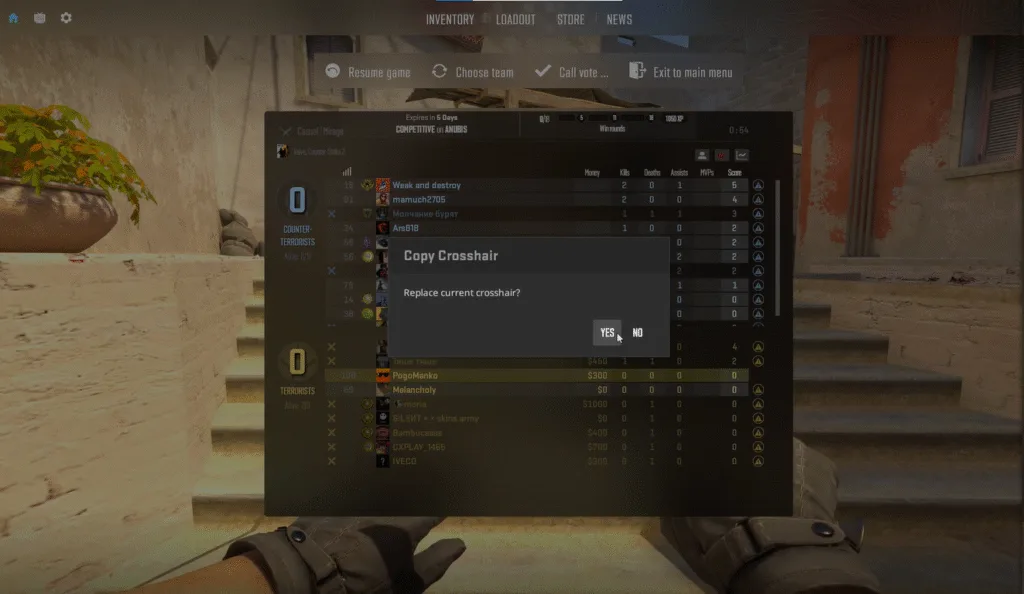
Method 2: Copy a Teammate’s Crosshair In-Game
Saw a clean crosshair mid-match? You can grab it instantly.
How to Copy Crosshair from Another Player
- Open the scoreboard (TAB)
- Click on a player’s name
- Select “Copy Crosshair”
This works in:
- Competitive
- Premier
- Deathmatch
- Community servers
Perfect for quick inspiration without leaving the match.
Method 3: Copy Crosshair Using Console Commands
This method is great if you already have someone’s config or prefer manual control.
How to Enable Console
If your console isn’t enabled yet, follow this CS2 console setup guide.
Example Crosshair Console Commands
cl_crosshairsize 2
cl_crosshairgap -3
cl_crosshairthickness 1
cl_crosshair_drawoutline 1
cl_crosshaircolor 5
Downside: Console copying is more error-prone and slower than share codes.
Copying Pro Player Crosshairs (Most Used Option)
Many players prefer copying pros because their crosshairs are:
- Tested in high-level play
- Optimized for visibility
- Consistent across maps
Here are some popular options:
- s1mple CS2 crosshair & settings
- NiKo CS2 crosshair setup
- ZywOo CS2 crosshair settings
- m0NESY CS2 configuration
Each of these pages includes ready-to-import share codes.
Best Crosshair Types (Quick Comparison)
| Crosshair Type | Best For | Notes |
| Small Static | Riflers | Clean and precise |
| Dot Crosshair | Tapping | Popular with AWPers |
| Dynamic | Beginners | Shows movement inaccuracy |
| Thick Crosshair | Visibility | Great on bright maps |
If you play maps like Mirage or Inferno often, combining a clean crosshair with proper map callouts (like Mirage callouts or Inferno callouts) can massively improve reaction time.
Common Crosshair Copying Mistakes
Avoid these rookie errors:
- Using dynamic crosshairs in competitive play
- Copying without testing on multiple maps
- Ignoring resolution and stretched settings
- Blindly copying without adjusting thickness
Your resolution (especially stretched) affects how crosshairs look. If you play stretched, see this CS2 stretched resolution guide.
Best Tips After Copying a Crosshair
Once you copy a crosshair:
- Test it in Aim Training maps
- Play Deathmatch for 10–15 minutes
- Adjust thickness slightly if needed
- Save your favorite code somewhere safe
Pairing the right crosshair with optimized CS2 video settings and best sensitivity settings gives the best results.
Frequently Asked Questions (FAQs)
Can I copy crosshair from CS:GO to CS2?
Yes. Most CS:GO share codes still work, but CS2 may slightly adjust visuals due to Source 2.
What’s the best crosshair color in CS2?
Cyan, green, and white are the most visible across maps.
Do crosshairs affect spray accuracy?
Indirectly. A clear crosshair helps you track recoil patterns better.
Is copying crosshairs allowed?
Yes. It’s a built-in CS2 feature and fully allowed.
Final Thoughts
Learning how to copy crosshair in CS2 is one of the easiest upgrades you can make—yet many players overlook it. Whether you’re copying a teammate, a pro, or a share code from a guide, the right crosshair makes aiming feel effortless.
If you’re serious about improving, combine this with:
- Proper CS2 binds
- Optimized launch options
- Smart practice commands
Small changes add up, Happy fragging.